
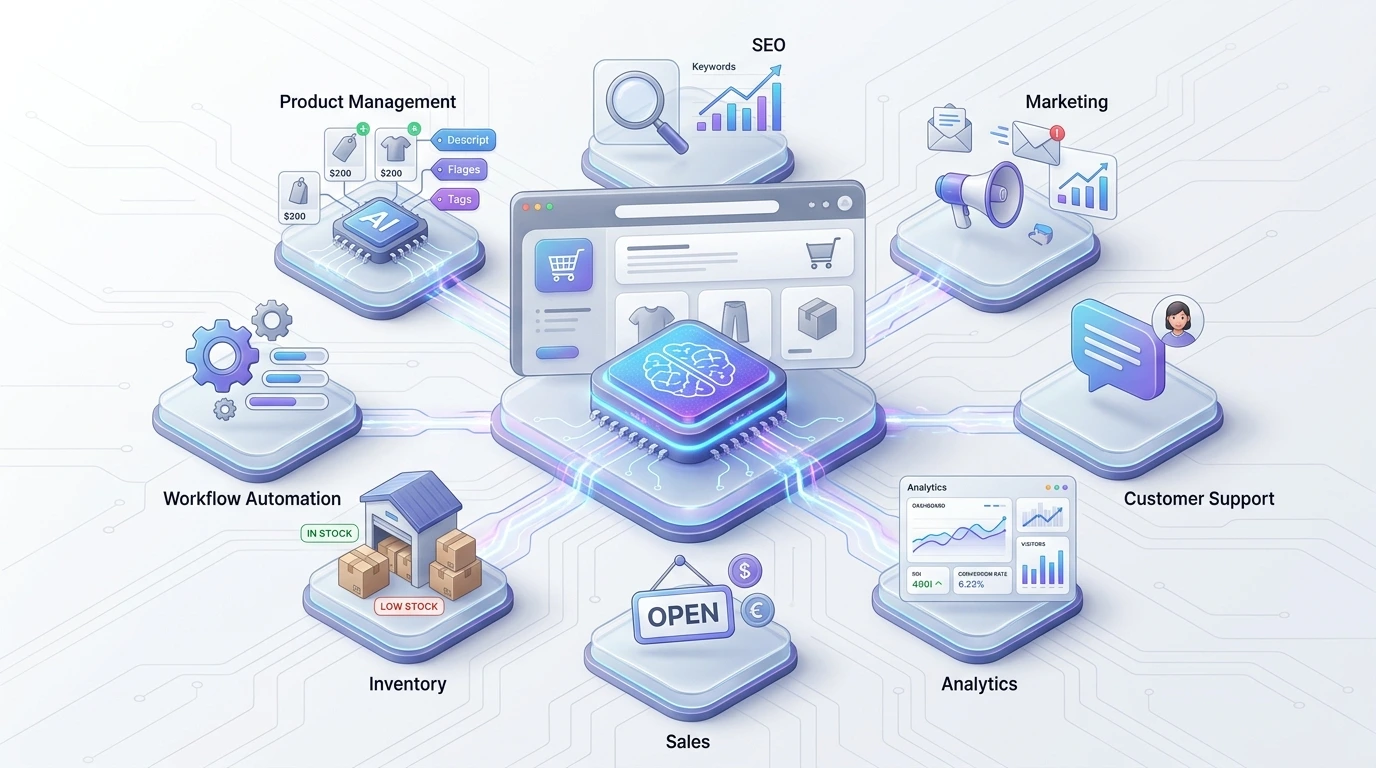
AI Ecommerce Automation Tools: The Complete Guide to Automating Online Stores in 2026
Table of Contents
- What Are AI Ecommerce Automation Tools?
- Why Ecommerce Businesses Need AI Automation in 2026
- How AI Ecommerce Automation Works
- Best AI Ecommerce Automation Tools by Category
- AI Tools for Product Content Automation
- AI SEO Automation Tools for Ecommerce
- AI Marketing and Sales Automation
- AI Customer Support Automation
- AI Analytics and Conversion Automation
- AI Inventory and Demand Forecasting
- AI Ecommerce Workflow Automation
- How to Choose the Right AI Automation Tools
- AI Ecommerce Automation by Business Size
- Common AI Automation Mistakes
- Practical AI Ecommerce Automation Strategy
- The Future of Ecommerce Automation
- Frequently Asked Questions
- Final Takeaway
What Are AI Ecommerce Automation Tools?
Quick Answer: AI ecommerce automation tools use artificial intelligence, machine learning, natural-language processing, and predictive analytics to cut down repetitive work across an online store. They handle things like product content, SEO, customer service, marketing, analytics, personalization, and inventory planning — usually by connecting to your store’s data and acting on it automatically.
Running an online store involves hundreds of repetitive tasks. A merchant may need to write product descriptions, optimize pages for search, answer customer questions, send abandoned-cart emails, analyze sales data, create marketing campaigns, update product information, and monitor inventory.
AI ecommerce automation changes how many of these tasks get done.
Instead of manually completing every process, businesses can use AI-powered software to analyze information, generate content, spot patterns, make recommendations, and trigger predefined actions.
One thing worth being clear about: AI automation isn’t just using a chatbot or a content generator.
A useful automation system connects data + AI decision-making + workflow execution.
For example:
Customer visits product page → AI analyzes behavior → customer leaves → automation identifies abandonment → personalized email is triggered → customer returns → purchase is recorded → analytics system updates customer profile.
That’s a connected workflow, not just a stack of separate AI tools bolted together.
AI Automation vs Traditional Automation
Traditional automation usually follows fixed rules:
If X happens → perform Y.
AI-powered automation adds interpretation and prediction on top of that:
Analyze X → understand the situation → predict the most appropriate action → perform Y.
This difference matters more once a business has a large product catalog, a diverse customer base, and marketing data that keeps shifting.
Key Areas AI Can Automate
| Ecommerce Function | Possible AI Automation |
|---|---|
| Product Content | Descriptions, titles, attributes, summaries |
| SEO | Keyword suggestions, content optimization, internal linking |
| Marketing | Campaigns, segmentation, personalization |
| Sales | Recommendations, lead qualification, upselling |
| Customer Support | Chatbots, FAQs, ticket classification |
| Analytics | Insights, anomaly detection, forecasting |
| CRO | Testing ideas, personalization, behavioral analysis |
| Inventory | Demand forecasting, replenishment signals |
| Design | Product visuals, banners, social creatives |
| Operations | Workflow triggers, data synchronization |
The most effective approach is rarely “automate everything.” It’s smarter to first identify the repetitive, high-volume processes where automation actually moves the needle—not just adds another tool to manage.
Why Ecommerce Businesses Need AI Automation in 2026
Quick Answer: Ecommerce has become increasingly data-intensive. Even a small store generates a constant stream of information from:
- Website visits
- Product views
- Search queries
- Shopping carts
- Purchases
- Email interactions
- Customer support conversations
- Advertising campaigns
- Social media activity
- Inventory records
Manually making sense of all of that is close to impossible past a certain size. AI automation is what turns those raw data points into actions.
1. Saves Time on Repetitive Work
A store owner shouldn’t have to spend hours a week on the same repetitive task. Automation can draft product descriptions or sort customer inquiries into categories, freeing up human review time to focus on accuracy and brand voice instead of typing from scratch.
2. Supports Personalization
AI systems can read customer behavior and help a business deliver more relevant recommendations, messages, and offers—instead of treating every visitor the same way.
3. Improves Operational Scalability
Without automation, growth usually means hiring or grinding through more manual work. With decent workflows in place, a business can handle a lot more volume without every task scaling up at the same rate.
4. Helps Businesses React Faster
AI-powered analytics can flag unusual patterns, demand shifts, or campaign issues well before a manual weekly report would catch them.
5. Creates Better Connections Between Tools
The real advantage usually comes from integration, not any single tool:
Shopify/WooCommerce → CRM → Email Platform → Analytics → AI → Automation Workflow
Instead of isolated systems, information moves through a connected pipeline.
Industry surveys on automation adoption tend to move fast and go stale within months, so rather than quote a specific figure here, the practical takeaway is this: adoption has shifted from “nice to have” to “expected” for stores competing on customer experience, and the businesses seeing the biggest gains are the ones automating a specific bottleneck rather than everything at once.
If you’re new to AI-powered ecommerce, start with our AI Ecommerce Tool 2026: Complete Guide. It provides a broader overview of AI tools, strategies, and workflows that can help online stores choose the right technology for their business.
How AI Ecommerce Automation Works
An AI ecommerce automation workflow generally combines customer or business data, an AI model, business rules, and an automation platform. Data comes in, AI interprets or predicts something, rules decide the next action, and the system carries out that action through connected apps.
There are five stages worth understanding.
Stage 1: Data Collection
The system pulls in relevant information—customer behavior, product data, order history, search queries, website analytics, inventory levels, and support messages.
Stage 2: AI Analysis
AI processes that information to spot patterns, generate content, classify data, or produce predictions.
Stage 3: Decision Logic
The system decides whether a specific action should fire. For example:
If customer has abandoned cart + customer has opted into email + cart value exceeds threshold → start recovery workflow.
Stage 4: Action
The automation executes the task — sending an email, creating a support ticket, updating a customer segment, generating content, notifying a team member, or updating a database.
Stage 5: Measurement
The business checks whether the automation actually did what it was supposed to. This step gets skipped more often than it should. Automation without measurement just creates activity, not results.
Best AI Ecommerce Automation Tools by Category
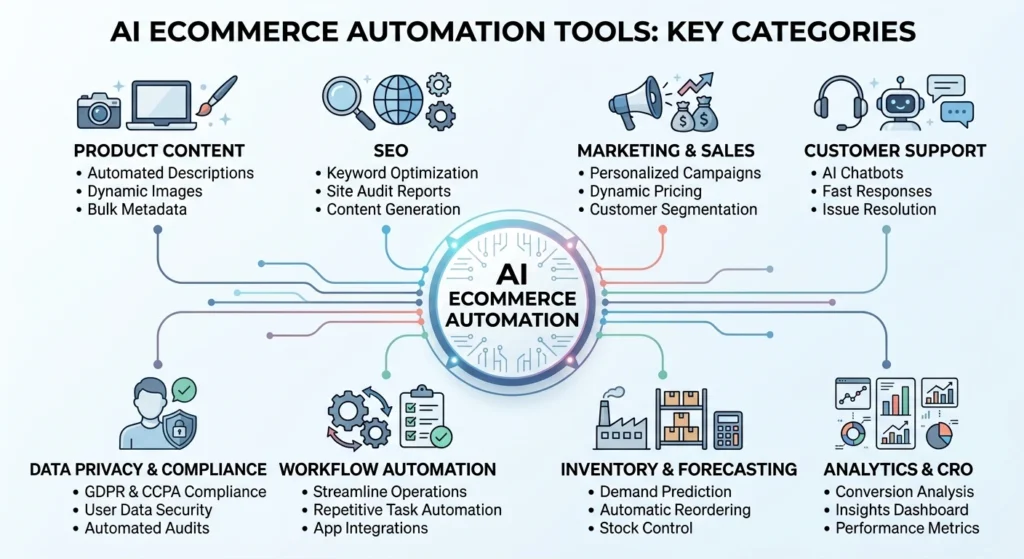
The right AI ecommerce automation tool depends entirely on which workflow you’re trying to fix. Product content, SEO, marketing, customer support, analytics, design, and inventory each call for different capabilities — and a connected stack of a few good tools usually beats relying on one tool to do everything.
Here’s a practical breakdown by category, including what each tool is actually best at.
AI Content Tools
| Tool | Best For | Notes |
|---|---|---|
| ChatGPT | Drafting product copy, FAQs, email content | Flexible and fast, but needs a structured product-info prompt to avoid generic output |
| Jasper | Brand-voice-consistent marketing copy at scale | Built for teams that need tone/style guardrails across many writers |
Artificial Intelligence SEO Tools
| Tool | Best For | Notes |
|---|---|---|
| Surfer SEO | Content optimization against top-ranking pages | Strong for on-page scoring and content briefs |
| Semrush | Keyword research, competitor gap analysis, backlink audits | The broadest all-in-one option; steeper learning curve |
| Ahrefs | Backlink analysis and keyword difficulty | Popular alternative to Semrush with a cleaner UI for link data |
AI Design Tools
| Tool | Best For | Notes |
|---|---|---|
| Canva | Product graphics, banners, social creatives | AI-assisted design features (Magic Resize, background remover) speed up bulk asset creation |
Email & Marketing Automation
| Tool | Best For | Notes |
|---|---|---|
| Klaviyo | Ecommerce-specific segmentation and automated email/ SMS flows | Deep Shopify/WooCommerce integration, strong abandoned-cart flows |
Analytics Tools
| Tool | Best For | Notes |
|---|---|---|
| Microsoft Clarity | Free heatmaps and session recordings | Good starting point for small stores; no cost barrier |
| Mixpanel | Product and funnel analytics | Better suited to businesses that want event-level behavioral data |
CRO Tools
| Tool | Best For | Notes |
|---|---|---|
| VWO | A/B testing and personalization | Easier setup for non-technical teams |
| Optimizely | Enterprise-grade experimentation | Overkill for most small stores; built for larger testing programs |
Customer Support
| Tool | Best For | Notes |
|---|---|---|
| AI chatbot platforms (e.g., Tidio, Gorgias) | Automating FAQ-style tickets and order-status questions | It should be scoped to approved knowledge sources, not left to improvise |
Workflow Automation
| Tool | Best For | Notes |
|---|---|---|
| Zapier | Connecting apps without code | Largest app library; simplest to start with |
| Make | Complex, multi-branch automations | More visual and flexible than Zapier for advanced workflows |
Note: Tool capabilities, pricing, and AI features change frequently. Always check current functionality on the vendor’s site before committing to a subscription.
AI Tools for Product Content Automation
Product content is one of the easiest ecommerce workflows to partially automate.
A store with 10 products can manage content by hand. A store with 10,000 products needs something more scalable.
What AI Can Automate
- Product descriptions
- Product titles
- Bullet points
- Feature summaries
- Product FAQs
- Category descriptions
- Comparison copy
- Email product copy
- Social media captions
- Product metadata
That doesn’t mean publishing everything without a second look, though.
The Human-in-the-Loop Model
A solid workflow looks like this:
Product database → AI content generation → quality checks → human review → CMS → publication
The human review step should catch things like the following:
- Specifications
- Measurements
- Pricing claims
- Product benefits
- Warranty information
- Brand voice
- Regulatory language
Practical Tip
Build a structured product information sheet before asking AI to generate copy. Include product name, brand, category, materials, dimensions, key features, target customer, benefits, warranty, shipping info, and any important limitations.
The better the input data, the more usable the output — this is the single biggest lever for cutting down on rewrites.
AI SEO Automation Tools for Ecommerce
Ecommerce SEO is full of repetitive optimization tasks, and this is where AI can save real hours—as long as it’s supporting strategy rather than replacing judgment, especially on competitive queries.
Ecommerce SEO Automation Workflow
Keyword research → search intent classification → topic cluster → content brief → draft → optimization → internal linking → human review → publication → performance monitoring
Keyword Clustering
Instead of writing one article per keyword variation, group related search queries by intent.
Primary Topic: AI ecommerce automation tools
Related topics:
- AI tools for ecommerce
- ecommerce automation software
- AI automation for online stores
- ecommerce workflow automation
- AI sales automation
- AI customer service tools
- ecommerce marketing automation
- AI inventory tools
That’s what builds a real topic cluster instead of a pile of thin, overlapping pages.
Programmatic Ecommerce SEO
Large stores can use structured data to automate parts of SEO—product templates that dynamically generate meta titles, meta descriptions, product schema, breadcrumbs, internal links, and image metadata.
The catch: automation here needs guardrails against duplicate or thin content, which is a common way large catalogs get hit by quality issues.
GEO and AEO Opportunity
Search optimization isn’t just about blue links anymore. Content should be structured so AI systems can understand what the page answers, who it’s for, which claims are backed up, how concepts relate, and what makes the recommendation different from the next page.
Use concise definitions, comparison tables, factual statements, FAQs, and clear headings to make that easy for both readers and AI systems to parse.
AI Marketing and Sales Automation
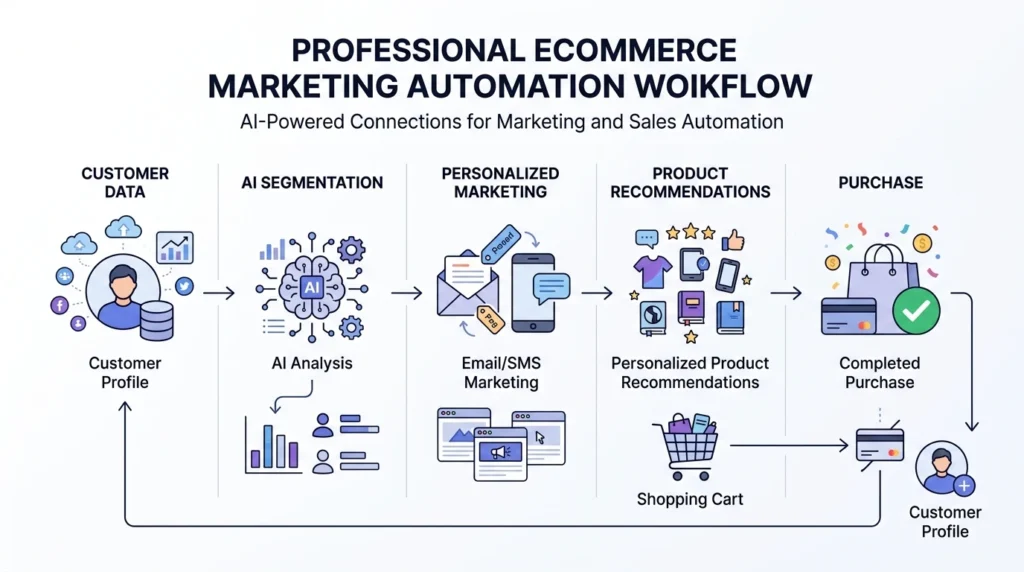
Marketing automation is one of the biggest opportunities for ecommerce businesses — not because it lets you send more messages, but because it lets you send more relevant ones without manually managing every campaign.
Automated Customer Segmentation
AI can group customers by behavior:
- First-time visitors
- Repeat customers
- High-value customers
- Inactive customers
- Frequent browsers
- Cart abandoners
- Category-specific buyers
Each segment can then get a different message instead of one generic blast.
Abandoned Cart Automation
A basic workflow:
Cart abandoned → wait → reminder → product benefit message → incentive if appropriate → final reminder
AI can improve this by factoring in context—cart value, browsing history, and past purchase pattern—instead of sending the exact same sequence to every customer.
Product Recommendations
Recommendation systems typically use:
- Previous purchases
- Product views
- Similar customer behavior
- Product relationships
- Shopping history
This supports cross-selling, upselling, related products, and frequently-bought-together combinations.
Email Content Automation
AI can help draft subject lines, email bodies, product recommendations, promotional copy, and segmentation ideas. Human review still matters here—discounts, promotional claims, and brand positioning need a second pair of eyes before they go out.
AI Customer Support Automation
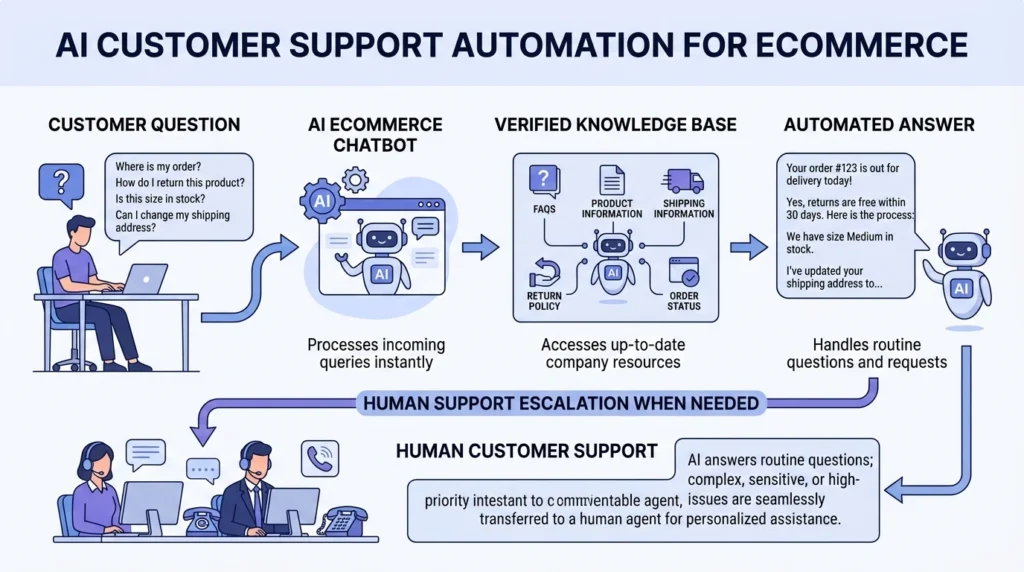
Customer support is a natural fit for automation because so many questions repeat: Where’s my order? What’s your return policy? How long does delivery take? Do you ship internationally? What payment methods do you accept? Is this product in stock? How do I use this product?
AI Chatbots
A well-configured ecommerce chatbot pulls answers from approved sources. What it shouldn’t do is invent information when it doesn’t know something.
Knowledge-Grounded Support
A stronger setup looks like this:
Store policies + product database + shipping information + FAQ → AI assistant → customer
The assistant should answer using verified business information only — not guesswork.
When AI Should Escalate
Hand off to a human when:
- The customer is angry or distressed
- A refund exception is requested
- The issue involves fraud
- The customer reports a serious product problem
- Information simply isn’t available
- The AI has low confidence
- A human judgment call is required
The best customer service automation isn’t the one that answers the most questions—it’s the one that knows which questions it shouldn’t try to answer.
AI Analytics and Conversion Automation
Analytics only becomes useful once it leads to action. Instead of just staring at a dashboard, the goal is a cycle: Observe → Understand → Act → Measure.
Example
Say a store notices mobile users have a much higher checkout abandonment rate than desktop. An automated system could:
- Detect the change.
- Alert the marketing or product team.
- Identify the affected page.
- Compare recent website changes.
- Suggest possible causes.
- Create an optimization task.
- Track the result after implementation.
Metrics to Monitor
| Metric | Why It Matters |
|---|---|
| Conversion Rate | Measures purchase efficiency |
| Average Order Value | Indicates revenue per order |
| Cart Abandonment | Identifies checkout friction |
| Customer Acquisition Cost | Measures acquisition efficiency |
| Customer Lifetime Value | Estimates long-term customer value |
| Repeat Purchase Rate | Indicates retention |
| Refund Rate | Highlights product/customer issues |
| Revenue per Visitor | Connects traffic with business outcomes |
Benchmark numbers for these metrics vary a lot by niche, price point, and traffic source, so rather than lean on a generic industry average, track your own baseline for each metric before automating anything — that’s the number that actually matters for measuring improvement.
AI Inventory and Demand Forecasting
Inventory mistakes are expensive in both directions.
Too much inventory creates storage costs, cash-flow pressure, discounting, and obsolete stock. Too little creates lost sales, customer dissatisfaction, delayed fulfillment, and lower product availability.
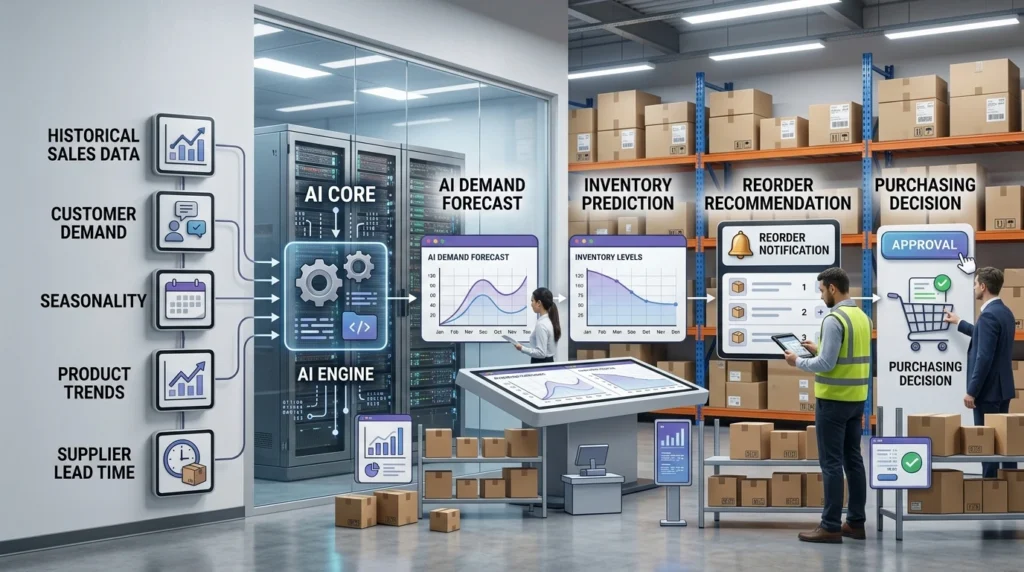
AI Demand Forecasting
Forecasting systems typically analyze historical sales, seasonality, product trends, promotional periods, inventory movement, regional demand, and supplier lead times.
Automated Reorder Signals
A simplified workflow:
Inventory falls below the threshold. → forecast demand → check supplier lead time → estimate required quantity → notify purchasing team
For higher-risk products, keep a human approval step in the loop.
Important Warning
Don’t assume AI forecasting is automatically accurate. Black Friday, unexpected viral trends, supply-chain disruptions, product launches, and sudden market shifts can all break historical patterns—forecasts should be treated as informed estimates, not guarantees.
AI Ecommerce Workflow Automation
Workflow automation is where individual AI capabilities turn into something closer to an operating system for the business.
Example Workflow 1: New Product
New product added → AI generates draft content → SEO checks → image task created → approval notification → product published
Example Workflow 2: Customer Lead
Lead submitted → CRM record created → AI classifies lead → segment assigned → email sequence started → sales notification
Example Workflow 3: Negative Customer Feedback
Negative review detected → AI classifies complaint → customer record checked → support ticket created → manager notified
Example Workflow 4: Weekly SEO Monitoring
Weekly data collected → ranking changes analyzed → significant drops detected → report generated → task assigned
The Automation Stack
| Layer | Function |
|---|---|
| Data Layer | Store, CRM, analytics, product data |
| AI Layer | Classification, generation, prediction |
| Automation Layer | Triggers and workflows |
| Human Layer | Approval, judgment, exceptions |
The human layer shouldn’t disappear as automation grows — it should just move toward higher-value decisions instead of repetitive ones.
How to Choose the Right AI Automation Tools
Before picking a tool, work through seven questions.
1. What Problem Are You Solving?
Don’t start with “Which AI tool should I buy?” Start with “Which process is eating too much time or producing bad results?”
2. What Is the Current Cost?
Measure staff hours, error frequency, delays, lost opportunities, and operational costs tied to the current process.
3. Does the Tool Integrate With Your Store?
Check compatibility with your ecommerce platform, CRM, email platform, analytics, payment systems, and inventory system.
4. How Good Is the Data?
AI can’t fix fundamentally poor data. If product attributes are incomplete, an AI-generated description will be incomplete too.
5. Can You Measure ROI?
ROI = (Financial Gain − Automation Cost) ÷ Automation Cost × 100
Track the metric before and after automation — not just afterward.
6. What Happens When AI Is Wrong?
Can humans approve outputs? Is there an audit trail? Can actions be reversed? Can workflows be paused? Are confidence thresholds available?
7. Does It Scale?
A tool that works for 100 products may choke at 100,000. Check API limits, workflow volume, data processing, pricing tiers, team permissions, and integration reliability.
AI Ecommerce Automation by Business Size
Small Ecommerce Store
Start with product content assistance, email automation, a customer FAQ chatbot, basic analytics, and social content workflows. The goal is saving time without adding technical complexity.
Growing Ecommerce Business
Add advanced segmentation, CRM automation, AI customer support, SEO workflows, product recommendations, inventory forecasting, and automated reporting.
Large Ecommerce Operation
Focus on API integrations, data governance, AI evaluation, workflow orchestration, permission management, model monitoring, human approval systems, and experimentation.
The larger the business, the more governance matters.
Common AI Automation Mistakes
Mistake 1: Automating a Broken Process
If the existing process is inefficient, automation just makes the inefficiency happen faster. Simplify the workflow first, then automate it.
Mistake 2: Publishing AI Content Without Review
AI-generated content can contain incorrect facts, unsupported claims, repetitive language, wrong specifications, or generic wording. Always review anything commercially important.
Mistake 3: Buying Too Many Tools
More software doesn’t automatically mean a better stack. Five disconnected tools can create more work than one integrated system.
Mistake 4: Ignoring Data Quality
Incorrect product information produces unreliable automation, no matter how good the AI model is.
Mistake 5: Measuring Activity Instead of Outcomes
“We automated 5,000 tasks” isn’t the useful metric. “What business result did those 5,000 tasks produce?”
Mistake 6: Removing Human Oversight
AI should handle the appropriate tasks — humans should keep responsibility for sensitive, expensive, unusual, or high-impact decisions.
Mistake 7: Forgetting Customer Experience
A customer doesn’t care that AI saved the company 10 hours if they got a bad answer. Automation should feel useful, not robotic.
Practical AI Ecommerce Automation Strategy
Step 1: Audit Your Workflows
List repetitive tasks and record frequency, time required, error rate, business impact, difficulty, and data availability for each.
| Workflow | Frequency | Time Cost | Automation Potential |
|---|---|---|---|
| Product descriptions | High | High | High |
| Customer FAQs | Very High | High | High |
| Weekly reporting | Weekly | Medium | High |
| Refund decisions | Medium | Medium | Low–Medium |
| Strategic pricing | Medium | High | Human-led |
Step 2: Prioritize by Impact
Impact × Frequency × Automation Feasibility
A repetitive task with high business impact and reliable data is usually the best starting point.
Step 3: Build a Small Pilot
Don’t automate the whole business at once. Pick one workflow — say, an abandoned-cart email sequence — and run it for a few weeks against the old process.
Step 4: Add Human Approval
AI → Review → Approval → Action
As confidence builds, low-risk actions can become more automated over time.
Step 5: Measure Business Results
Track hours saved, conversion rate, revenue, support response time, customer satisfaction, content production speed, error rate, and inventory availability — before and after.
Step 6: Scale What Works
Once one workflow is reliable, connect it to others:
Product Content → SEO → Marketing → Analytics → Customer Data
That’s what turns individual automations into a real ecosystem.
Where AI Automation Creates the Most Value
The biggest opportunity isn’t replacing individual manual tasks with AI one by one. It’s connecting multiple processes so information from one workflow improves the next—creating faster feedback loops between customer behavior, content, marketing, sales, support, and operations.
Many businesses ask, “What task can AI do for me?” A better question is: “What information can move automatically through my business to improve the next decision?”
A customer searches for a product. That interaction generates a signal. The signal can influence:
Search → Product recommendation → Email segment → Marketing campaign → Purchase → Customer profile → Future recommendation
The value comes from the connection between workflows, not any single automated step.
The Ecommerce Automation Flywheel
Customer Data → AI Analysis → Personalized Action → Customer Response → New Data → Improved Decision
That’s a continuous learning cycle—and it’s more strategically valuable than just generating content faster.
Human-in-the-Loop AI: The Best Model for Ecommerce
Not every ecommerce decision should be automated.
Good Candidates for Full Automation
Basic notifications, data synchronization, routine reports, simple categorization, standard FAQ responses, low-risk administrative tasks.
Good Candidates for AI-Assisted Automation
Product descriptions, SEO content, marketing campaigns, customer segmentation, analytics summaries, and product recommendations.
Human-Led Decisions
Legal claims, sensitive complaints, major pricing decisions, refund exceptions, high-value customer issues, brand strategy, and business strategy.
As a rule of thumb, the more a decision could damage trust or cost real money if it goes wrong, the more it belongs with a person, not a model.
How to Measure AI Automation ROI
AI automation ROI should be measured with financial and operational outcomes — not the number of tasks automated.
Example
Say a business spends 40 hours a month creating product content. After implementing an AI-assisted workflow, that drops to 15 hours a month — a savings of 25 hours a month.
Time savings alone aren’t enough, though. Also check: did content quality stay acceptable? Did organic traffic improve? Did the conversion rate change? Were product errors reduced? Did the team use the saved time productively?
A Better Measurement Model
Automation Value = Time Saved + Revenue Improvement + Error Reduction − Total Automation Cost
That gives a more honest picture than “hours saved” alone.
The Future of Ecommerce Automation
AI Agents
AI systems are moving beyond simple question-answering toward multi-step task execution—for example: Find low-stock products → analyze sales → prepare reorder recommendation → notify purchasing manager. The system performs a sequence, not just a single answer.
Multimodal Ecommerce AI
AI increasingly works across text, images, product catalogs, customer conversations, video, and structured data—opening up richer product management than text-only tools allowed.
Predictive Commerce
Instead of reacting after the fact, businesses are trying to predict customer churn, product demand, purchase intent, inventory shortages, and campaign performance. These predictions still need validation — no forecasting system removes uncertainty entirely.
More Autonomous Workflows
The long-term direction is shifting from
Human → Tool
toward:
Human → AI System → Multiple Tools
Humans increasingly define goals and boundaries while AI-assisted systems coordinate the individual tasks.
Frequently Asked Questions
What are AI ecommerce automation tools?
Software that uses AI to automate or assist with ecommerce tasks — product content, marketing, customer support, SEO, analytics, personalization, inventory planning, and workflow management.
What is the best AI automation tool for ecommerce?
There’s no single best tool for every store. It depends on the workflow, ecommerce platform, data requirements, integrations, budget, and business goals.
Can AI automate an entire online store?
AI can automate or assist with many processes, but full autonomy isn’t appropriate everywhere. Human oversight still matters for sensitive, strategic, financial, and high-risk decisions.
Can AI automate product descriptions?
Yes. AI can generate descriptions from structured product data. Review the output for factual accuracy, specs, brand voice, and misleading claims before publishing.
Can AI automate ecommerce SEO?
AI can assist with keyword research, topic clustering, content briefs, metadata, internal linking, optimization, and performance analysis. Human strategy still matters for search intent, competition, and technical SEO.
How does AI help ecommerce marketing?
Through customer segmentation, personalization, email campaigns, product recommendations, campaign analysis, content creation, and customer journey automation.
Can AI automate customer service?
Yes, for routine questions and ticket classification/routing. Complex, sensitive, or unusual issues should go to human agents.
Is AI ecommerce automation expensive?
Costs vary a lot. Some businesses start with existing AI and automation software; larger companies may need custom integrations and enterprise platforms. What matters is whether the automation earns back more than it costs.
Is AI-generated ecommerce content good for SEO?
Not automatically. It depends on quality, originality, accuracy, search intent, and genuine usefulness — not on volume.
How can a small ecommerce business start with AI?
Pick one repetitive workflow with measurable value—product content, customer FAQs, email automation, reporting, or basic marketing workflows are common starting points.
What is the difference between AI automation and ecommerce automation?
AI Ecommerce Automation Tools can run on predefined rules alone. AI automation adds language understanding, prediction, classification, recommendations, and content generation on top.
Can AI improve ecommerce conversion rates?
It can support conversion optimization through personalization, recommendations, behavioral analysis, and experimentation — but improvements should be validated through measurement or testing, not assumed.
What data does AI ecommerce automation need?
Depending on the workflow: product information, customer behavior, transaction history, inventory records, website analytics, marketing data, and customer support information.
Should ecommerce businesses use multiple AI tools?
Multiple tools can work well when each solves a specific problem and they integrate properly. Unnecessary tools just add cost, duplicated data, and complexity.
What is human-in-the-loop ecommerce automation?
AI performs or prepares a task while a person reviews, approves, or handles exceptions—balancing automation speed with human judgment.
Final Takeaway
AI ecommerce automation tools are becoming a core part of running a modern online store, but the biggest opportunity isn’t simply swapping manual tasks for AI ones.
The real opportunity is connecting data, intelligence, workflows, and human decision-making into one system.
A strong automation strategy can help streamline product content, SEO, marketing, sales, customer support, analytics, conversion optimization, inventory management, reporting, and general business workflows.
The best way to start is small: identify one repetitive process, establish a baseline, automate the appropriate portion, keep human oversight where it matters, measure the result, then scale what actually works.
The future of ecommerce isn’t going to be about who uses the most AI tools. It’s going to be about who builds the most effective AI-powered system around their store.
For related reading, see our guides on AI tools for Ecommerce: Complete Guide pillar page, AI tools for small ecommerce businesses, AI marketing automation tools, free AI tools for Ecommerce Stores and best AI tools for E-Commerce