

AI Product Image Generator Tools in 2026: 8 Best Options Compared
Table of Contents
- What Are AI Product Image Generator Tools?
- How AI Product Photo Generators Work
- Best AI Product Image Generator Tools in 2026
- AI Product Photography Tools Compared
- How to Choose an AI Product Photo Tool
- How to Create Product Images With AI
- AI Product Images vs Real Photography
- Common Mistakes With AI Product Image Generators
- Pro Tips for Better AI Product Photos
- Marketplace Rules for AI Product Images
- Frequently Asked Questions About AI Product Image Generators
What Are AI Product Image Generator Tools?
Quick Answer: AI product image generator tools use artificial intelligence to create or improve ecommerce photos from a basic product shot or a text prompt. They remove backgrounds, build lifestyle scenes, fix lighting, and export listing-ready files, so sellers can skip much of a traditional studio shoot.
Most tools fall into three groups, and knowing which one you need saves a lot of trial and error.
Background replacers keep your real product and swap the setting around it. Scene generators build a full lifestyle environment, like a kitchen counter or a bathroom shelf. Text-to-image models create visuals from a written prompt, which gives you freedom but less control over whether the product looks right.
For ecommerce, the first two are the safer bet because your actual product pixels stay intact. The third is great for ad concepts, as long as you check the details.
Looking for more AI tools to create better product images and designs? Explore our complete guide to AI Product Image & Design Tools for ecommerce.

How AI Product Photo Generators Work
Quick Answer: These tools first cut your product out of its background using a segmentation model. A diffusion model then generates a new scene, and the software blends in shadows, reflections, and color. Stronger tools keep logos and edges intact, while weaker ones warp labels and fine details.
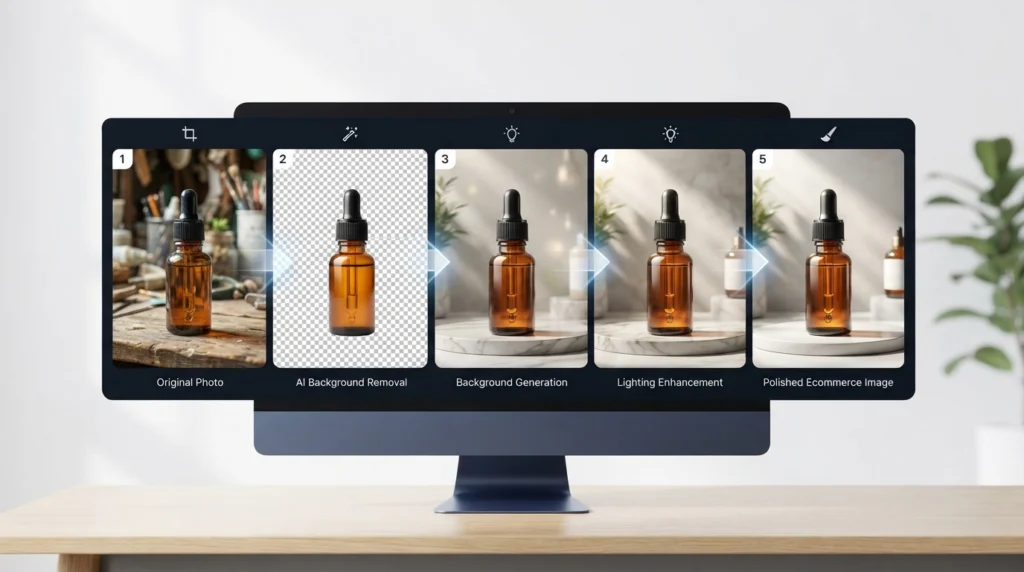
Under the hood there are four steps: cutout, scene generation, compositing, and upscaling. The cutout finds your product’s edges. The scene step paints a new background from your prompt or a template. Compositing matches shadow, reflection, and color temperature so the product looks like it belongs there. Upscaling then sharpens the result for marketplace zoom.
Compositing is where most results fall apart. When the shadow points the wrong way, shoppers can’t explain what feels off, but they feel it, and they scroll on.
Best AI Product Image Generator Tools in 2026
Quick Answer: The best AI product image generator tools in 2026 depend on your goal. Photoroom suits fast marketplace photos, Pebblely suits beginners, Flair.ai suits branded scenes, Adobe Firefly suits Photoshop users, Claid.ai suits big catalogs, and Gemini or ChatGPT suit custom concepts. Test each with your own product.
Features and pricing in this category change often, so check each tool’s official page before you decide.
Photoroom: A Fast AI Product Photo Editor for Marketplace Sellers
Photoroom is built around speed. Background removal, ready-made templates, and batch editing make it a natural fit if you list dozens of SKUs a week. The trade-off is that templates can make a whole catalog look the same after a while.
Pebblely: A Beginner-Friendly AI Product Photoshoot Tool
You upload, pick a theme, and generate. That simplicity is why first-time sellers like it. You get less control over lighting and composition than you would want for a polished brand.
Flair.ai: A Scene Builder for Branded Product Mockups
Flair.ai lets you arrange your product on a virtual set, so you decide what sits where. That control suits brands with a clear visual identity. Expect a short learning curve compared with one-click tools.
Adobe Firefly: Commercially Positioned AI Image Generation
Adobe markets Firefly around licensed training data and commercial use, which matters if legal risk worries you. It also fits into Photoshop, so you can fix small problems by hand. It works best if you are comfortable editing.
Canva Magic Studio: An AI Image Maker for Marketing Graphics
If your product photos end up in banners, social posts, and emails, Canva keeps everything in one place. It is less specialized in product realism than dedicated tools, so use it for the design layer more than the photo itself.
Claid.ai: Bulk AI Product Photo Enhancement for Large Catalogs
Big catalogs need consistency more than creativity. Claid.ai focuses on enhancing, upscaling, and standardizing images at volume, and it can run through an API. It is a poor choice if you want imaginative lifestyle scenes.
Gemini and ChatGPT: Flexible AI Image Models for Product Concepts
General image models can edit a product photo or invent a scene from a sentence. They suit mood boards and ad concepts best. Before anything goes on a listing, check that the text, proportions, and colors survived.
Bonus: Remove.bg for quick product cutouts
It is not a full generator, but a clean cutout is step one of most AI product photography workflows, and Remove.bg focuses on exactly that job.

AI Product Photography Tools Compared
Quick Answer: Photoroom leads on speed, Pebblely on simplicity, Flair.ai on scene control, Adobe Firefly on editing depth, Canva on all-in-one design, and Claid.ai on bulk processing. Pick by catalog size, skill level, and how accurate your product must look.
| Tool | Best For | Skill Level | Bulk Editing | Creative Control | Free plan? |
|---|---|---|---|---|---|
| Photoroom | Speed, white backgrounds | Beginner | Yes. | Medium | |
| Pebblely | Simple lifestyle shots | Beginner | Limited | Low–Medium | |
| Flair.ai | Branded scenes | Intermediate | Limited | High | |
| Adobe Firefly | Photoshop workflows | Intermediate | Limited | High | |
| Canva Magic Studio | Marketing graphics | Beginner | Limited | Medium | |
| Claid.ai | Large catalogs, API | Intermediate–Advanced | Yes. | Low | |
| Gemini / ChatGPT | Concept visuals | Beginner | No | High (prompt-based) |
How to Choose an AI Product Photo Tool
Quick Answer: Choose an AI product photo tool by matching it to your biggest bottleneck: speed, brand consistency, or volume. Then test your hardest product, such as a glossy bottle or a transparent item, before paying. The tool that handles your worst photo is usually the right one.
Ask yourself five things before you pay for anything:
- What are you selling? Reflective, transparent, and fabric products are the hardest for AI.
- How many SKUs? Ten products and ten thousand need very different tools.
- How strict is color accuracy? Cosmetics and fashion buyers notice shifts quickly.
- Can you use the output commercially? Check the license for ads and listings.
- Does the resolution meet marketplace Zoom limits?
Pro tip: Run the same three products through every tool on your shortlist: one easy, one medium, one nightmare. Judge the tools by the nightmare.
How to Create Product Images With AI
Quick Answer: To create product images with AI, shoot a sharp source photo, upload it, remove the background, generate a scene from a specific prompt, inspect logos and shadows at full zoom, then export at your marketplace’s resolution. Always compare the result with the real product before publishing.
- Shoot a clean source photo. Natural window light and a plain surface are enough. Input quality drives output quality more than any setting.
- Cut out the product. Check the edges, especially around handles, straps, and transparent parts.
- Write a specific prompt. “Nice background” gives random results. Try “matte oak table, soft morning light from the left, shallow depth of field.”
- Generate several versions. Make four to eight, then pick the most believable one, not the most dramatic.
- Zoom to 100%. Look for warped text, floating edges, and shadows that make no sense.
- Export with SEO in mind. Use a descriptive file name and alt text, and compress for fast loading.
AI Product Images vs Real Photography
Quick Answer: AI product images work well for backgrounds, lifestyle scenes, and ad variations. Real photography is safer for texture-critical, color-sensitive, or regulated products like cosmetics, jewelry, and food. Most stores do best with a mix: AI for volume and variety, real shots for accuracy.
AI should not replace every photo. It is strong when the product is simple and the goal is variety, like seasonal banners or social posts. It is risky when the buyer needs to judge a fabric’s texture, a gemstone’s color, or a supplement label.
A simple rule: if a wrong detail could cause a return or a complaint, use a real photo for that image.
Common Mistakes With AI Product Image Generators
Quick Answer: The most common AI product photography mistakes are skipping a zoom check, picking unrealistic scenes, changing the product’s color or size, and ignoring marketplace rules. These raise return rates and can get listings suspended, so verify every image against the real item first.
- Not zooming in. Melted logos and garbled text are the most common failures.
- Over-styling. A $12 phone stand on a marble penthouse balcony looks suspicious, and shoppers notice.
- Misleading scale. If the product looks bigger than it is, expect returns.
- Color drift. Generated lighting can quietly change your product’s real color.
- One style for every product. Identical scenes make a store look templated.
- Skipping the rules. Some platforms have policies on synthetic imagery.
Pro Tips for Better AI Product Photos
Quick Answer: For better AI product photos, match the scene’s light direction to your source photo, save prompts that work, keep one real photo in every gallery, and A/B test your hero image. These habits keep listings believable and consistent, which supports trust and conversions.
- Match the light. If your source photo is lit from the right, prompt for light from the right. A mismatch is the biggest giveaway that an image is fake.
- Keep a prompt library. Save working prompts with the product category noted, so your catalog stays consistent.
- Put one real photo in every gallery. It reassures buyers who suspect everything else is generated.
- Make separate sets. A white-background main image, a lifestyle image, and an ad creative each have a different job.
- A/B test the hero image. Compare an AI lifestyle hero against a clean studio-style one and let click-through data decide.
- Treat image SEO seriously. Descriptive file names, alt text, and structured product data help Google Images and AI search engines understand what you sell.
Marketplace Rules for AI Product Images
Quick Answer: Amazon generally requires a pure white background for main images, and the product must be shown accurately. Lifestyle images are more flexible. AI-generated images are usually fine if they aren’t misleading, but policies change, so check each platform’s current rules before uploading.
| Platform | Main Image | Secondary Images | Risk to Watch | Official Source |
|---|---|---|---|---|
| Amazon | Pure white background, accurate product | More flexible | Misrepresenting the product | [amazon.com] |
| Shopify store | Your own standards | Full flexibility | Inconsistent brand look | [shopify.com] |
| Etsy | Must show the actual item | Flexible | Handmade claims with unrealistic imagery | [Etsy.com] |
Frequently Asked Questions About AI Product Image Generators
What is the best AI product image generator in 2026?
There is no single winner. Photoroom is strong for speed, Pebblely for beginners, Flair.ai for branded scenes, and Adobe Firefly for editing control. Test two or three with your own products.
Can AI product photos replace professional photography?
For many catalog and social images, yes. For hero campaigns, texture-critical items, or luxury goods, professional photography is still more reliable.
Are AI-generated product images allowed on Amazon?
Generally yes, if the image shows the product accurately and follows the main-image rules, like a pure white background. Check Amazon’s current guidelines before uploading.
Is there a free AI product photo generator?
Several tools offer free tiers or trials, usually with limits on resolution, watermarks, or monthly credits.
How do I make AI product photos look realistic?
Start with a sharp source photo, match the light direction in your prompt, keep the scene believable for the product’s price, and inspect shadows and edges at full zoom.
Can I use AI-generated product images commercially?
Usually, but terms vary by tool. Read the commercial-use license, especially for ads and resale.
Will AI product images hurt my SEO?
Not by themselves. Google looks at quality, relevance, and usefulness. Use accurate images with descriptive file names, alt text, and fast loading.
Do AI product photos increase conversions?
They can, when they add clarity and context. Results vary by niche, so A/B test against your current images.
Final Thoughts on AI Product Image Generator Tools
These tools will not rescue a weak product or a thin listing. What they do well is cut production time and give small stores a more polished look. Pick one tool, test it on your hardest product, and keep every image honest. Buyers reward stores that look the way they promise.
Related Guides
- AI Product Image & Design Tools
- AI Product Image Generator Tools in 2026
- AI Background Remover for Product Photos
- AI Image Upscaler for Ecommerce Photos: 7 Best Tools in 2026
9 Best AI Product Photography Tools in 2026 (Compared & Priced)