

9 Best AI Product Photography Tools in 2026 (Compared & Priced)
A good product photo can decide whether someone buys or scrolls past. But studio shoots are expensive, and a quick phone photo on a cluttered desk rarely does your product justice. That’s the gap AI product photography tools try to fill. They remove backgrounds, build realistic scenes, fix lighting, and turn one basic photo into several usable images. Some do this brilliantly. Others produce plastic-looking results that make your product look fake.
This guide compares nine tools, explains what each does best, and shows where sellers usually go wrong. The comparison is based on each vendor’s published features and pricing as of October 2026, so always test your own product before you commit.
Table of Contents
- What Are AI Product Photography Tools?
- Benefits of AI Product Photography for Ecommerce
- 9 Best AI Product Photography Tools in 2026
- Comparison Table
- Pricing and Free Plans
- How to Choose the Right AI Product Photo Generator
- How to Create AI Product Photos Step by Step
- Best AI Photography Tools for Different Ecommerce Products
- Best Practices
- Common Mistakes to Avoid
- AI Product Images and SEO
- Frequently Asked Questions
- Final Verdict
What Are AI Product Photography Tools?
Quick Answer: AI product photography tools use artificial intelligence to remove backgrounds, generate new scenes, fix lighting, and create marketing images from a basic product photo. They help online sellers get studio-style visuals without a physical shoot, though every result still needs a human check for accuracy.
Traditional product photography needs a camera, lights, a backdrop, and often a photographer. AI-based alternatives start from one existing photo and build everything else around it.
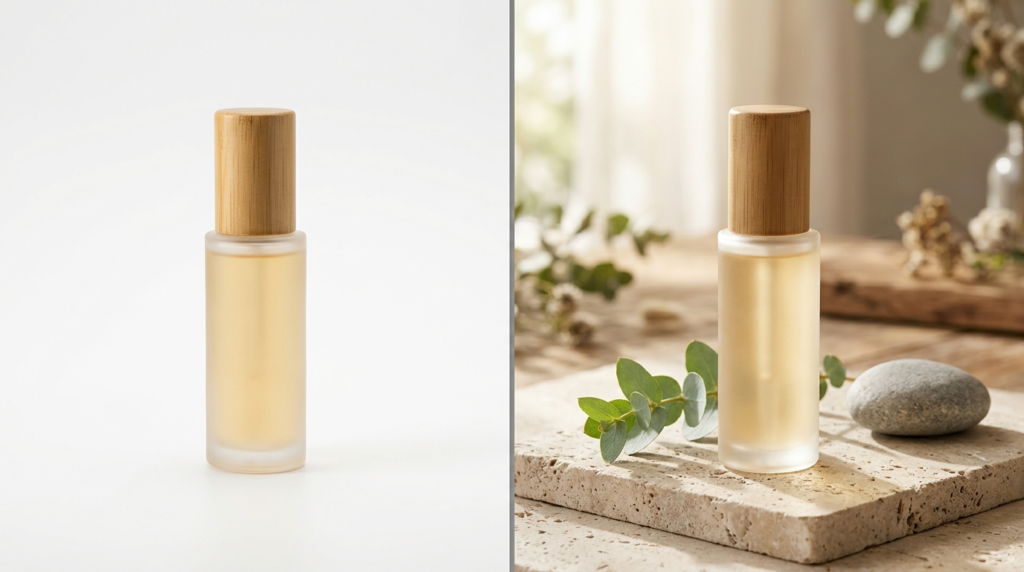
Say you sell a skincare bottle. You photograph it on a plain table, and the AI places it in a clean bathroom scene with soft daylight. The same bottle can then become a website banner, an ad, or an email header.
How an AI Product Photo Generator Works
Most platforms combine a few core technologies:
- Background removal: separates your product from its original surroundings.
- Generative scene creation: builds a new background or edits selected areas.
- Lighting and shadow correction: makes the product look like it belongs in the scene.
- Image enhancement: improves sharpness, resolution, and color.
- Virtual models: places clothing or accessories on AI-generated people.
- Batch processing: applies the same edit to hundreds of images at once.
A seller who needs clean marketplace images doesn’t need the same features as a fashion brand building lifestyle campaigns. That’s why “the best tool” depends on the job.
The goal is simple: keep the product and remove the distraction. Looking for more tools to create better product images and designs? Explore our complete guide to AI Product Image & Design Tools for ecommerce.
Benefits of AI Product Photography for Ecommerce
Less Editing, More Variety
One clear photo can become a white-background listing image, a lifestyle scene, a seasonal campaign visual, and a square social post. That’s a lot of creative testing without booking a single shoot.
Consistent Branding Across Your Catalog
Many tools let you save templates, colors, and settings. A skincare brand, for example, can keep the same soft shadows and neutral tones across every listing, which makes the whole store look more trustworthy.
Easier Scaling for Large Catalogs
Editing 500 images by hand is painful. Tools with batch editing and API access cut that repetitive work. Photoroom, for example, offers batch processing and API workflows for ecommerce, though that is the vendor’s own description, not independent proof of better sales.
Savings vary by product type, and you should still budget time to review and correct every generated image.
9 Best AI Product Photography Tools in 2026
Quick Answer: Photoroom suits everyday editing, Pebblely suits lifestyle scenes, Flair.ai suits art-directed visuals, and Claid.ai suits large catalogs. Pixelcut, Adobe Firefly, Canva, Shopify’s built-in tools, and Fibbl cover quick edits, creative work, design, store workflows, and 3D. Pick based on your biggest bottleneck, not hype.
This list is organized by use case instead of crowning one universal winner, because that claim wouldn’t be honest.
1. Photoroom: Best All-Round AI Product Photo Editor
Best for: small stores, resellers, and teams that want editing and scene generation in one place.
Photoroom is built around product images, not general design. It handles background removal, AI backgrounds, product staging, shadows, virtual models, and batch work.
Pros: focused on ecommerce, works for solo sellers and bigger catalogs, covers several tasks in one workflow.
Cons: higher-volume features need a paid plan, the API is billed separately from the app subscriptions, and generated scenes still need an accuracy check.
Bottom line: A sensible first pick if you want one tool for daily cleanup and the occasional lifestyle image. Visit Photoroom
2. Pebblely: Best AI Product Photo Generator for Lifestyle Scenes
Best for: small brands that want attractive scenes without learning design software.
Pebblely turns a basic product shot into lifestyle-style imagery using templates and prompts. It suits skincare, beauty, accessories, and home goods.
Pros: beginner-friendly, quick to create several concepts, helps small brands look more polished.
Cons: you may need several attempts, intricate product details can drift, and plans cap the number of images per month.
Bottom line: Great when you want pretty scenes fast. It’s less great when you need exact control. Visit Pebblely
3. Flair.ai: Best for Art-Directed Product Scenes
Best for: brands that want control over props, surfaces, and mood.
Flair.ai lets you compose a scene visually instead of relying only on text prompts. A perfume brand could try several campaign looks around the same bottle without a new shoot. It also offers AI models, video, and ad generation.
Pros: strong creative control, good for branded campaign concepts.
Cons: complex scenes take more experimenting, lower tiers may not include a commercial license, and it’s more than you need for plain background removal.
Bottom line: Worth it if you think like an art director. Overkill if you just need clean listing photos. Visit Flair.ai
4. Claid.ai: Best AI Product Image Tool for Large Catalogs
Best for: ecommerce teams and developers handling many SKUs.
Claid.ai focuses on image processing at scale: enhancement, background work, lighting adjustments, and API-based automation. It’s handy when supplier photos arrive in different styles and you need them standardized. Usage runs on a monthly credit system, where each action (AI photoshoot, edit, or upscale) costs a set number of credits.
Pros: API access supports automation, good for consistency across many products.
Cons: integration may need technical help, credits expire monthly, and small stores won’t use most of it.
Bottom line: If you only have a few dozen products, skip it for now. Visit Claid.ai
5. Pixelcut: Best for Quick Mobile Edits
Best for: solo sellers and creators who work mostly from a phone.
Pixelcut offers background removal, AI scenes, and ready-made templates in a simple interface. It’s useful for fast listing fixes and daily social posts.
Pros: easy to learn, quick results, handles several content formats.
Cons: free-plan daily limits and monthly AI credits apply, and complex compositions may need manual fixes.
Bottom line: Not a pro workflow, but very practical when speed matters. Visit Pixelcut
6. Adobe Firefly: Best for Creative Control
Best for: designers and marketing teams already inside Adobe’s ecosystem.
Firefly brings generative image tools to Adobe’s creative apps. It’s good for extending backgrounds, building campaign concepts, and fixing small areas of an image. It isn’t a dedicated product photography platform, so you may need another tool for accurate cutouts.
Pros: flexible, precise when paired with Photoshop, and useful for broader creative work.
Cons: less direct than ecommerce-first tools, needs more skill, and commercial terms should be checked.
Bottom line: The most flexible option here, and the one with the steepest learning curve. Visit Adobe Firefly
7. Canva: Best for Product Photos Plus Marketing Designs
Best for: small businesses combining product images with promotional layouts.
Canva is a design platform first. Its AI and background tools help prepare product visuals, then drop them into branded templates sized for each channel.
Pros: easy to use, great for consistent branding, handles the whole marketing layout.
Cons: less specialized than dedicated product photo tools, and some features need a paid plan.
Bottom line: Perfect if you already live in Canva. Not the first choice for generating product scenes from scratch. Visit Canva
8. Shopify’s Built-In AI Tools: Best for Shopify Merchants
Best for: sellers who want to stay inside their store admin.
Shopify offers AI-assisted features for product content and image editing in supported workflows. What’s available depends on your plan, region, and the current admin interface, so check your own account.
Pros: convenient, fewer tools to juggle, keeps product management in one place.
Cons: not every feature appears in every account, and advanced scene generation may need another app.
Bottom line: Check what’s already in your dashboard before paying for something new. Visit Shopify
9. Fibbl: Best for 3D Product Visualization
Best for: brands that need 3D or interactive product views, especially footwear and accessories.
Fibbl works differently from photo editors. It focuses on 3D visualization for richer digital shopping experiences, so it’s a more specialized production process.
Pros: shows detail a flat photo can’t, useful for brands exploring 3D commerce.
Cons: unnecessary for basic listings, and pricing is quote-based, so you’ll need to contact the vendor.
Bottom line: A strategic choice, not a casual one. Visit Fibbl
AI Product Photography Tools Comparison Table
| Tool | Best Use | Main Strength | Ideal User |
|---|---|---|---|
| Photoroom | Product editing | Editing, staging, automation | Ecommerce sellers |
| Pebblely | Lifestyle scenes | Scene generation | Small brands |
| Flair.ai | Creative campaigns | Art-directed scenes | Marketing teams |
| Claid.ai | Catalog workflows | Processing and API | Growing stores |
| Pixelcut | Quick edits | Easy mobile editing | Solo sellers |
| Adobe Firefly | Creative assets | Generative design | Designers |
| Canva | Marketing graphics | Photos plus layouts | Small businesses |
| Shopify tools | Store workflows | Built-in convenience | Shopify merchants |
| Fibbl | 3D visuals | Rich product views | 3D commerce brands |
This table reflects general use cases, not an independent benchmark. Confirm current features on each official site.
AI Product Photography Tools Pricing and Free Plans
Quick Answer: Most tools offer a free tier or trial with limits such as watermarks, daily caps or monthly credits, and paid plans start around $8 to $13 per month. Batch editing, API access and commercial licenses usually need a paid plan. Prices change often, so confirm on each official pricing page before you subscribe.
Prices in USD, checked October 2026. Monthly prices shown; annual billing is usually cheaper.
| Tool | Free Option? | Paid Plan Starts At | Watch For |
|---|---|---|---|
| Photoroom | Free tier | Pro: $12.99/mo ($89.99/yr) | Watermarks, export limits; API billed separately |
| Pebblely | No permanent free plan on recent listings (check for a trial) | Lite: $9/mo for 30 images; Pro: $39/mo for 500 images | Monthly image caps |
| Flair.ai | Free tier (5 images/mo) | Pro: $8/mo | Credit usage; commercial license on higher tiers |
| Claid.ai | Free trial with starter credits | Credit-based monthly plans (see pricing page) | Credits expire monthly; API usage |
| Pixelcut | Free tier with daily limits | Pro: $10/mo ($8/mo billed yearly) | Monthly AI credits |
| Adobe Firefly | Limited free daily generations | Standard: $9.99/mo | Credits, commercial terms |
| Canva | Free plan | Pro: about $15/mo ($120/yr) | Premium-only AI tools |
| Shopify tools | Depends on your plan | Included in plan | Feature availability |
| Fibbl | Not listed | Custom/quote-based | Project costs |
Vendors change plans often. Treat these figures as a snapshot and check each official pricing page before you buy.
How to Choose the Right AI Product Photo Generator
Start With Your Biggest Bottleneck
- Need white-background listing photos? Prioritize clean cutouts.
- Need lifestyle scenes? Look for realistic backgrounds and composition control.
- Selling clothing? Check virtual model quality and garment accuracy.
- Managing hundreds of SKUs? Look for batch tools and API access.
Compare Cost Per Approved Image, Not Just Price
A cheap plan can get expensive once you count failed generations and your own editing time.
Cost per approved image = total cost ÷ number of approved final images
Include subscription fees, credits, retries, staff time, and any API costs. For example, $40 spent to get 100 usable images works out to $0.40 each. That’s an illustration, not a real quote.
Test With Your Own Product
Vendor demos use easy products. Run your trickiest item through each tool and check shape, logos, packaging text, colors, shadows, and transparent areas. The prettiest image isn’t useful if it changes your product.
Check Rights and Privacy
Make sure you have permission to use the source photos and that the tool’s terms allow your commercial use.
How to Create AI Product Photos Step by Step
Step 1: Shoot a Clean Source Photo
Use bright, diffused window light, a steady camera, and a plain surface. A modern phone is enough. A blurry original stays blurry, no matter how clever the AI.
Step 2: Remove the Background
Upload the photo and create a cutout. Zoom in on edges, caps, and transparent areas, because that’s where weak tools slip.
Step 3: Write a Specific Prompt
Describe the setting, lighting, and mood, and tell the tool to keep the product unchanged. Here’s an example:
Premium skincare photo using the exact uploaded glass bottle on a light beige stone surface, soft neutral background, diffused daylight from the left, realistic contact shadows. Preserve the bottle shape, label, logo, color and proportions. No extra text or products.
Step 4: Refine and Create Variations
Adjust shadows, brightness, and composition. Then generate a few versions, such as a clean white background, a warm lifestyle scene, and a seasonal promo. The product stays identical in each.
Step 5: Export and Review
Pick the size and format your store needs, then compare the final image with the real product before publishing. Never publish before this check.

Best AI Photography Tools for Different Ecommerce Products
| Product Type | Tools to Evaluate | What to Double-Check |
|---|---|---|
| Skincare and beauty | Photoroom, Pebblely, Flair.ai | Labels, bottle shape, color |
| Fashion and accessories | Photoroom (virtual models), Flair.ai | Fit, texture, stitching |
| Jewelry and watches | Photoroom, Pixelcut | Gemstones, clasps, watch faces |
| Electronics | Photoroom, Claid.ai, Firefly | Ports, buttons, accessories |
| Furniture and decor | Pebblely, Flair.ai, Photoroom | Scale, legs, shadows |
Beauty products suit styled studio scenes, fashion needs accurate virtual models, jewelry demands fine-detail checks, electronics need exact ports and shapes, and furniture needs correct scale. Always verify the image still shows the item customers will actually receive.
AI Product Photography Best Practices
- Write a mini style guide. Define background colors, lighting, shadow strength, and image sizes so every new image matches.
- Use different images for different jobs. Marketplaces often want a plain main image, while your own site can carry lifestyle shots.
- Never add what isn’t real. No extra accessories, fake finishes, or exaggerated size.
- Keep one real photo in every listing. It builds trust, especially for newer stores.
- Run a checklist. Product matches reality, logo is accurate, edges are clean, shadows look natural, file size and format are correct.
Truthful representation matters more than dramatic effects.
Common AI Product Photography Mistakes to Avoid
- Starting with a poor photo. Fix lighting and focus first.
- Letting AI redesign the product. Labels and proportions can quietly change. Compare every result with the real item.
- Choosing drama over clarity. If the scene steals attention, buyers can’t see the product.
- Mixing visual styles. A random mix of looks makes a store feel messy. Save your templates.
- Skipping the full-size check. Tiny errors hide in thumbnails but jump out on a product page.
- Trusting text on packaging. AI often scrambles letters. Always zoom in.
Ignoring marketplace image rules is another common cause of rejected listings and higher returns. A short checklist before publishing prevents most of these problems.
AI Product Images and SEO
AI-generated product photos do not rank better on their own. Their SEO value comes from being accurate, fast-loading and well described.
Filenames and Alt Text
Use short, descriptive filenames like amber-glass-skincare-bottle.webp, not IMG_0025.jpg.
Write alt text that describes the image: “Amber glass skincare bottle on a beige stone surface.” Don’t stuff keywords into it.
Speed and Page Quality
Compress images and use WebP where possible, but don’t compress so hard that packaging text becomes unreadable. Pair strong images with accurate titles, specs, pricing, and fast mobile performance.
For more detail, see Google’s guidance on image SEO best practices and product structured data.
Frequently Asked Questions
What are the best AI product photography tools in 2026?
Photoroom, Pebblely, Flair.ai, Claid.ai and Pixelcut are strong options to compare. Adobe Firefly and Canva suit broader creative work. Your best pick depends on whether you need background removal, lifestyle scenes, batch processing, or marketing design.
Are AI product photography tools free?
Many offer a free tier or trial, usually with limits like watermarks, daily caps, or monthly credits. Some, like Pebblely, have recently removed permanent free plans. Check current limits and commercial-use terms before relying on a free plan.
Can AI create product photos from a single image?
Yes. One clear photo can generate new backgrounds and scenes. But a single angle may not contain enough detail to recreate every side of the product, so extra photos improve accuracy.
Can AI replace a professional product photographer?
It can replace routine work like background variations and simple promo images. Photographers still win on reflective items, complex styling, exact material accuracy, and high-stakes campaigns.
Which AI photography tool is best for small ecommerce stores?
Photoroom, Pebblely, and Pixelcut are good starting points. Test each with your real products and compare free limits before paying.
Can I use AI-generated product images on Amazon?
Often yes, for secondary images, as long as they follow Amazon’s current policies and represent the product accurately. Main images are usually held to stricter rules, so check the latest requirements for your category.
Can AI product photography increase sales?
It can improve presentation and help you test creative ideas, but better images don’t guarantee more sales. Price, traffic, reviews, and listing quality all matter. Test changes against real metrics.
Does AI product photography work for clothing?
Yes, some tools offer virtual models. Check that color, fit, texture, and stitching match the real garment, because customers return items that don’t look like the photos.
Are AI product photos good for SEO?
They can help when they’re relevant, accurate, and optimized. They don’t rank better just because AI made them. Alt text, file size, and page quality still decide the outcome.
How do I write a good AI product photography prompt?
Describe the setting, lighting, composition, and style, then tell the tool to preserve the product’s shape, colors, logos, and proportions. Generate a few versions and inspect each one closely.
Do I need to disclose that product images are AI-generated?
It depends on the platform and your region, and rules are changing. Whatever the rules say, never use AI to show something the buyer won’t actually receive.
Can I use AI product images commercially?
Usually on paid plans, but terms differ by tool. Read the licensing section and make sure you own the rights to the original photos.
Final Verdict: Which AI Product Photography Tool Should You Choose?
Quick Answer: Start with the tool that fixes your most frequent photo problem. Photoroom is a strong general starting point, Pebblely suits lifestyle scenes, Flair.ai suits creative control, and Claid.ai suits bulk work. Test your hardest product first and compare total cost before committing.
AI works best when it makes your workflow simpler without changing what you sell. If you run a small store, pick one or two tools, run them on a handful of real products, and keep whichever needs the least fixing.
Larger businesses will likely get more value from batch processing and automation than from extra creative effects.
One rule to keep: use AI to improve how your product is presented, never to change what your customer receives.
Related Guides
- AI Product Image & Design Tools
- AI Product Image Generator Tools in 2026
- AI Background Remover for Product Photos
- AI Image Upscaler for Ecommerce Photos: 7 Best Tools in 2026
Last updated: October 23, 2026. Pricing checked October 2026.