
AI Product Image Tools (2026): The Ultimate Guide to Creating High-Converting Commerce Visuals with Artificial Intelligence.
Table of Contents
Introduction
Why You Can Trust This Guide
What Are AI Product Image & Design Tools?
Why AI Product Images Matter in 2026
How AI Product Image Tools Work
Types of AI Product Image & Design Tools
Benefits of AI Product Image Tools
Traditional Design vs AI Product Image Tools
Who Should Use AI Product Image Tools?
Best AI Product Image Tools in 2026
AI Product Image Tools: Comparison Tables
AI Product Image Tools Buying Guide
AI Workflow Framework
SEO, AEO & GEO Best Practices
Future Trends
Frequently Asked Questions
Final Verdict
Introduction
Why You Can Trust This Guide
- It focuses on practical applications for eCommerce businesses rather than marketing hype.
- It compares tools based on real-world workflows, common use cases, and feature sets.
- It follows SEO, AEO (Answer Engine Optimization), GEO (Generative Engine Optimization), and E-E-A-T best practices.
- It is structured to help both human readers and AI-powered search systems understand the content.
- It is intended to be reviewed and updated regularly as AI technology evolves.
Editor’s Note: AI tools evolve quickly. Before purchasing a subscription or making business decisions, verify the latest features, pricing, and licensing information on each provider’s official website.
Quick Answer
What Are AI Product Image Tools?
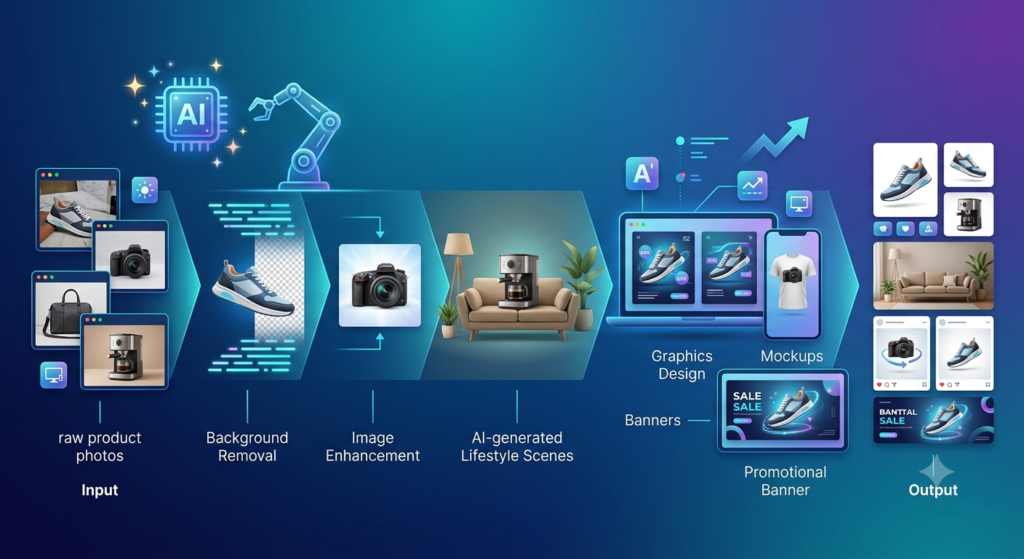
- eCommerce websites
- Online marketplaces
- Social media platforms
- Email marketing campaigns
- Digital advertisements
- Product catalogs
- Landing pages
What You’ll Learn in This Guide
- What AI product image and design tools are and how they work.
- The different categories of AI-powered visual creation tools.
- Which platforms are best for Shopify, Amazon, Etsy, WooCommerce, and other eCommerce businesses.
- How to build a scalable AI-powered design workflow.
- Best practices for optimizing AI-generated images for SEO, accessibility, and AI search engines.
- Common mistakes to avoid when using AI for product photography and design.
- Emerging trends that will shape AI-powered visual commerce over the next few years.
Core Technologies Behind AI Product Image & Design Tools
Quick Answer
1. Computer Vision
- Product edges
- Colors
- Materials
- Shapes
- Logos
- Shadows
- Background elements
- Automatic background removal
- Product detection
- Object segmentation
- Smart cropping
- Image cleanup
2. Machine Learning (ML)
- Enhance lighting
- Improve sharpness
- Reduce image noise
- Correct colors
- Maintain consistency across product catalogs
3. Generative AI
- Lifestyle scenes
- Marketing banners
- Promotional graphics
- Product mockups
- Social media creatives
- Advertising visuals
4. Diffusion Models
- Photorealistic environments
- Studio-quality lighting
- Realistic reflections
- Natural textures
- High-quality product photography
5. Natural Language Processing (NLP)
“Create a premium leather wallet on a wooden desk with warm natural lighting and a luxury lifestyle aesthetic.”
Core AI Technologies at a Glance

| Computer Vision | Understands image content | Background removal, object detection |
| Machine Learning | Improves editing accuracy | Color correction, enhancement |
| Generative AI | Creates new visuals | Lifestyle scenes, marketing graphics |
| Diffusion Models | Produces realistic images | Product photography, advertising visuals |
| Natural Language Processing | Understands text prompts | Text-to-image generation |
Why AI Product Images Matter in 2026
Quick Answer
The Growing Importance of Visual Commerce
- Multiple viewing angles
- High-resolution zoom
- Lifestyle photography
- Close-up product details
- Size or scale references
- Feature callouts
- Consistent branding across channels
Why Businesses Are Investing in AI Visual Creation
Faster Content Production
Lower Production Costs
- Professional photographers
- Studio rentals
- Lighting equipment
- Post-production editing
- Graphic design revisions
Better Creative Testing
- Different backgrounds
- Seasonal themes
- Lighting styles
- Promotional layouts
- Lifestyle environments
AI Supports Multi-Channel Selling
- Shopify
- Amazon
- Etsy
- WooCommerce
- eBay
- Google Shopping
- Facebook Shops
- TikTok Shop
Example AI Product Image Workflow
Key Benefits at a Glance
- Faster image production
- More consistent branding
- Easier content scaling
- Improved workflow efficiency
- Better support for multi-channel marketing
- Greater flexibility for creative testing
- Reduced manual editing effort
Summary
How AI Product Image Tools Work
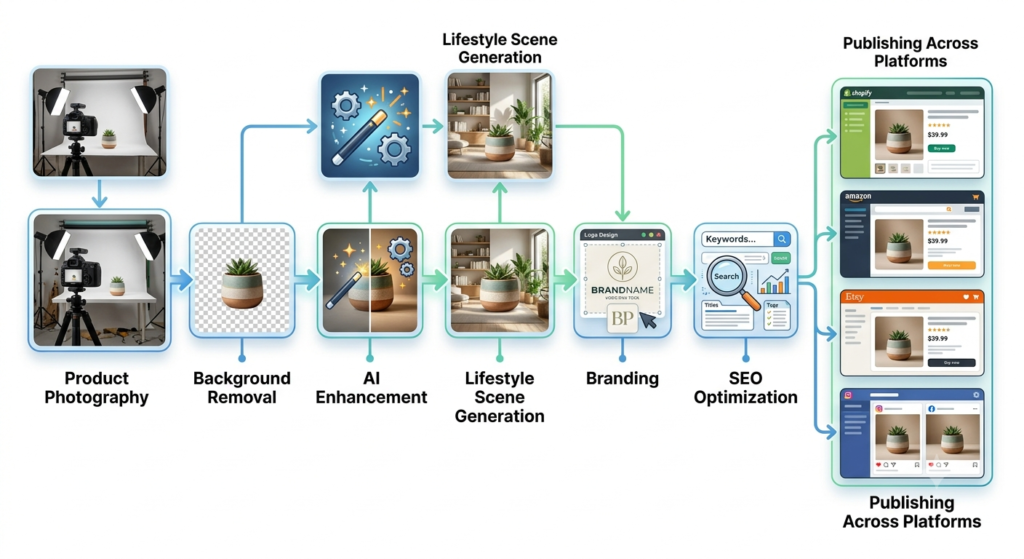
Quick Answer
Step 1: Upload a Product Image or Enter a Prompt
- Upload an existing product photo
- Generate an image using a text prompt
“Create a premium ceramic coffee mug on a wooden breakfast table with soft morning sunlight, Scandinavian interior design, realistic commercial photography, ultra-detailed.”
Step 2: AI Identifies the Product
- Product boundaries
- Colors
- Materials
- Shapes
- Shadows
- Reflections
- Logos
Step 3: Intelligent Image Enhancement
- Correcting exposure
- Adjusting white balance
- Enhancing colors
- Increasing sharpness
- Reducing digital noise
- Upscaling low-resolution images
Step 4: Background & Scene Generation
- White studio backgrounds
- Luxury interiors
- Outdoor scenes
- Office desks
- Holiday settings
- Kitchen countertops
- Nature-inspired compositions
Step 5: Export & Optimization
- WebP
- PNG
- JPEG
- High-resolution print formats
Types of AI Product Image Tools
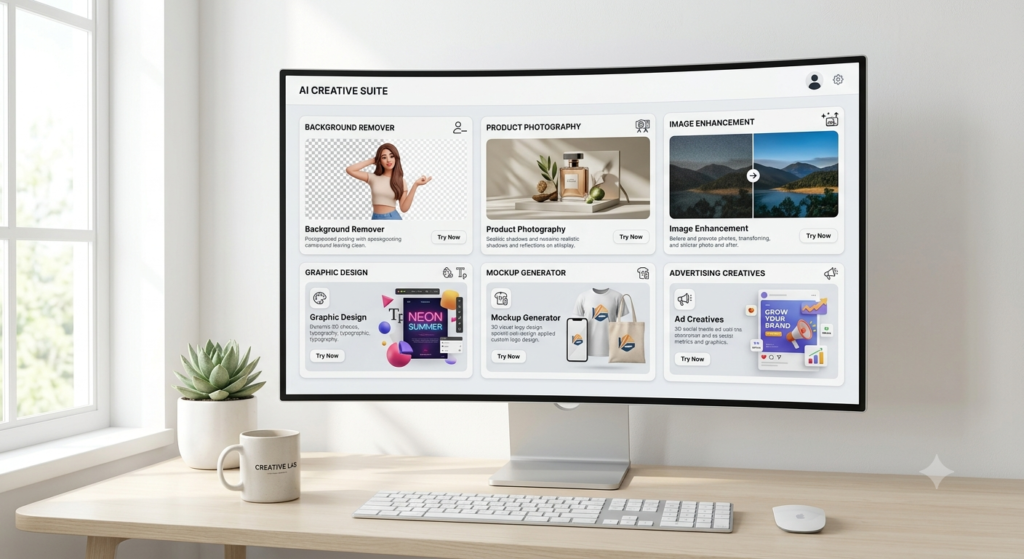
Quick Answer
1. AI Background Removal Tools
- Amazon listings
- Shopify stores
- eBay sellers
- Product catalogs
2. AI Product Photography Tools
- Studio-quality images
- Lifestyle scenes
- Seasonal environments
- Premium product displays
3. AI Image Enhancement Tools
- Increasing resolution
- Improving lighting
- Correcting colors
- Reducing blur
- Enhancing sharpness
4. AI Graphic Design Platforms
- Marketing banners
- Social media graphics
- Email visuals
- Landing page assets
- Promotional advertisements
5. AI Mockup Generators
- T-shirts
- Mugs
- Phone cases
- Packaging
- Books
- Posters
6. AI Advertising Creative Tools
- Facebook Ads
- Instagram creatives
- Display banners
- Promotional campaigns
- Product launch graphics
Benefits of AI Product Image Tools
Quick Answer
Faster Production
- Background removal
- Color correction
- Lifestyle scene generation
- Banner creation
- Image resizing
Lower Costs
- Professional photography
- Studio rentals
- Graphic design revisions
- Outsourcing repetitive editing tasks
Better Brand Consistency
- Brand colors
- Typography
- Visual style
- Product positioning
- Marketing templates
Easier A/B Testing
- Backgrounds
- Lighting
- Layouts
- Colors
- Promotional themes
Scalable Content Production
- Product pages
- Social media
- Email marketing
- Digital ads
- Seasonal campaigns
- Marketplace listings
Traditional Design vs AI Product Image Tools
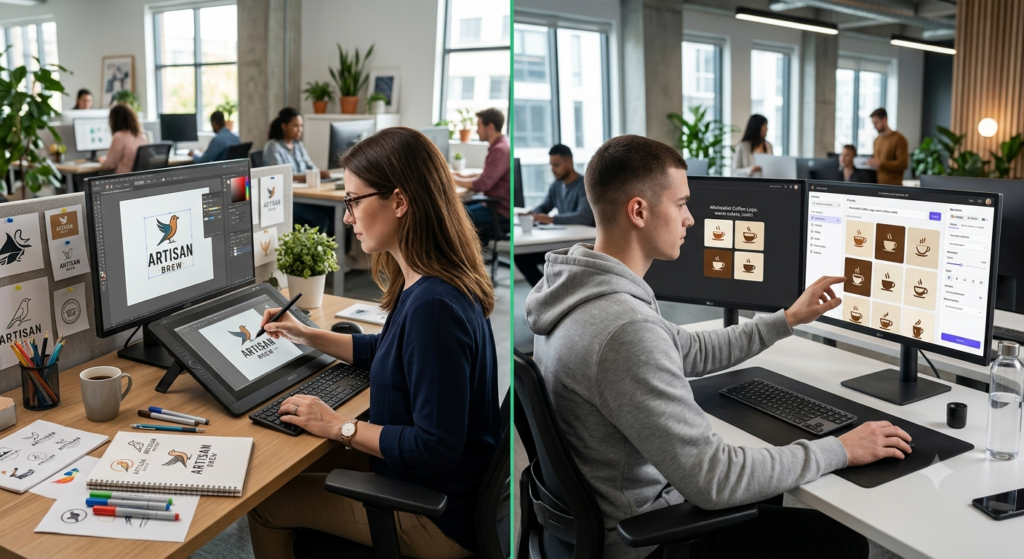
Quick Answer
| Speed | Moderate to Slow | Very Fast |
| Cost | Higher | Lower |
| Scalability | Limited | Excellent |
| Automation | Minimal | Extensive |
| Learning Curve | Steeper | Beginner-Friendly |
| Bulk Editing | Time-Consuming | Efficient |
| Creative Variations | Manual | Rapid Generation |
| Best Use Case | Custom Branding Projects | High-Volume eCommerce Content |
Who Should Use AI Product Image Tools?
Quick Answer
Ideal Users
- Shopify merchants
- Amazon sellers
- Etsy shop owners
- WooCommerce businesses
- eBay sellers
- Digital marketers
- Social media managers
- Graphic designers
- Marketing agencies
- Product photographers
- Small business owners
- Startups
- Print-on-demand businesses
- Dropshipping stores
Key Takeaways
- AI product image tools automate image creation, enhancement, and design tasks.
- Different categories of AI tools specialize in photography, graphic design, advertising, or mockup generation.
- Businesses can save time and reduce production costs while maintaining consistent branding.
- Combining AI automation with human oversight typically delivers the strongest creative results.
- Selecting the right tool depends on your business goals, workflow, budget, and preferred sales channels.
Best AI Product Image Tools in 2026

Quick Answer
How We Evaluated These AI Tools
Quick Answer
Evaluation Criteria
Image Quality | Professional visuals build trust and improve conversions. |
AI Accuracy | Accurate product detection reduces editing errors. |
Background Generation | Creates realistic studio and lifestyle scenes. |
Ease of Use | Shortens the learning curve for beginners and teams. |
Editing Flexibility | Makes revisions faster and easier. |
Brand Consistency | Helps maintain a unified visual identity. |
Export Options | Supports websites, marketplaces, social media, and print. |
Automation | Saves time on repetitive editing tasks. |
Collaboration | Important for agencies and larger marketing teams. |
Pricing & Value | Should align with business size and workflow needs. |
AI Product Image Tools: Comparison Tables
Photoroom | Product Photography | Yes | ⭐⭐⭐⭐⭐ | ★★★★★ |
Pebblely | Lifestyle Product Images | Limited | ⭐⭐⭐⭐⭐ | ★★★★☆ |
Pixelcut | Small eCommerce Stores | Yes | ⭐⭐⭐⭐⭐ | ★★★★☆ |
Claid | Enterprise Catalogs | Trial/Business | ⭐⭐⭐⭐☆ | ★★★★★ |
Canva | Marketing Graphics | Yes | ⭐⭐⭐⭐⭐ | ★★★★★ |
Adobe Express | Professional Branding | Yes | ⭐⭐⭐⭐☆ | ★★★★☆ |
Microsoft Designer | Quick Marketing Creatives | Limited | ⭐⭐⭐⭐⭐ | ★★★★☆ |
Kittl | Packaging & Typography | Yes | ⭐⭐⭐⭐☆ | ★★★★☆ |
*Ratings are based on overall suitability for common eCommerce workflows rather than a single feature.
Which Tool Is Best for Your Business?
Quick Answer
Recommended by Business Type
| Shopify Store | Photoroom or Canva |
| Amazon Seller | Photoroom |
| Etsy Shop | Pixelcut |
| Print-on-Demand Business | Kittl |
| Marketing Agency | Canva + Adobe Express |
| Enterprise Retailer | Claid |
| Small Business | Canva or Pixelcut |
| Content Creator | Microsoft Designer |
Decision Matrix
- Need marketplace-ready product photos? → Photoroom
- Need realistic lifestyle scenes? → Pebblely
- Need an all-in-one design platform? → Canva
- Need Adobe ecosystem integration? → Adobe Express
- Need enterprise automation? → Claid
- Need quick social media graphics? → Microsoft Designer
- Need typography and merchandise design? → Kittl
What Makes a Great AI Product Image Tool?
- Produce realistic, high-resolution images.
- Preserve accurate product details.
- Support batch editing for efficiency.
- Generate multiple creative variations.
- Offer templates for different marketing channels.
- Maintain consistent branding.
- Export images optimized for websites and marketplaces.
- Continue improving through regular feature updates.
Pro Tip
- Photoroom for background removal.
- Pebblely for lifestyle photography.
- Canva for banners and social media graphics.
Detailed Review of the Best AI Product Image Tools (2026)

1. Photoroom
Quick Answer
Overview
Best For
- Shopify Stores
- Amazon Sellers
- Etsy Shops
- eBay Businesses
- Facebook Marketplace
- Small Businesses
- Dropshipping Stores
- Print-on-Demand Sellers
Key Features
- AI Background Removal
- AI Background Generation
- Smart Shadows
- Reflection Effects
- AI Object Removal
- Batch Editing
- AI Image Expansion
- Automatic Cropping
- Marketplace Templates
- Mobile & Desktop Support
Pros
- ✅ Extremely beginner-friendly
- ✅ Fast processing speed
- ✅ High-quality background removal
- ✅ Excellent mobile app
- ✅ Batch editing saves time
- ✅ Great for marketplace images
Cons
- ❌ Limited advanced graphic design features
- ❌ Premium features require a paid subscription
- ❌ Less suitable for complex branding projects
Overall Rating
| Ease of Use | ⭐⭐⭐⭐⭐ |
| Image Quality | ⭐⭐⭐⭐⭐ |
| AI Accuracy | ⭐⭐⭐⭐⭐ |
| Automation | ⭐⭐⭐⭐⭐ |
| Value for Money | ⭐⭐⭐⭐☆ |
| Overall | ⭐⭐⭐⭐⭐ |
Recommended For
2. Pebblely
Quick Answer
Overview
Best For
- Direct-to-Consumer (DTC) Brands
- Beauty Products
- Home Décor
- Food & Beverage
- Fashion Accessories
- Handmade Products
Key Features
- AI Lifestyle Scenes
- Seasonal Backgrounds
- Holiday Themes
- Brand Color Customization
- Marketing Templates
- Batch Image Generation
- Prompt-Based Editing
- High-Resolution Exports
Pros
- ✅ Creates realistic lifestyle images
- ✅ Very easy to use
- ✅ Fast image generation
- ✅ Great for social media marketing
- ✅ Consistent visual style
Cons
- ❌ Not designed for complex graphic design
- ❌ Limited template customization
- ❌ Advanced editing options are fewer than full design platforms
Overall Rating
| Ease of Use | ⭐⭐⭐⭐⭐ |
| Lifestyle Images | ⭐⭐⭐⭐⭐ |
| Creativity | ⭐⭐⭐⭐⭐ |
| Automation | ⭐⭐⭐⭐☆ |
| Value | ⭐⭐⭐⭐☆ |
| Overall | ⭐⭐⭐⭐☆ |
Recommended For
3. Claid
Quick Answer
Overview
Best For
- Enterprise Retailers
- Large eCommerce Stores
- Online Marketplaces
- Product Catalog Management
- Agencies Handling Large Volumes
Key Features
- AI Image Enhancement
- AI Relighting
- Background Replacement
- Resolution Improvement
- Batch Processing
- API Integration
- Automated Workflows
- Catalog Optimization
Pros
- ✅ Handles thousands of images efficiently
- ✅ Excellent consistency
- ✅ Strong automation capabilities
- ✅ Enterprise-ready APIs
- ✅ High-quality image enhancement
Cons
- ❌ More expensive than beginner tools
- ❌ Learning curve for advanced workflows
- ❌ Better suited to larger businesses
Overall Rating
| Image Quality | ⭐⭐⭐⭐⭐ |
| Automation | ⭐⭐⭐⭐⭐ |
| Scalability | ⭐⭐⭐⭐⭐ |
| Ease of Use | ⭐⭐⭐⭐☆ |
| Enterprise Features | ⭐⭐⭐⭐⭐ |
| Overall | ⭐⭐⭐⭐⭐ |
Recommended For
4. Pixelcut
Quick Answer
Overview
Best For
- Small Businesses
- Shopify Stores
- Etsy Sellers
- Instagram Shops
- Content Creators
- Entrepreneurs
Key Features
- AI Background Remover
- Magic Eraser
- AI Image Generator
- Image Upscaling
- Product Templates
- Social Media Templates
- Batch Editing
- Team Collaboration
Pros
- ✅ Easy for beginners
- ✅ Multiple AI features in one platform
- ✅ Good template selection
- ✅ Fast editing workflow
- ✅ Affordable for growing businesses
Cons
- ❌ Fewer advanced branding tools than Canva
- ❌ Limited enterprise automation
- ❌ Some premium features require paid plans
Overall Rating
| Ease of Use | ⭐⭐⭐⭐⭐ |
| AI Editing | ⭐⭐⭐⭐☆ |
| Templates | ⭐⭐⭐⭐☆ |
| Automation | ⭐⭐⭐⭐☆ |
| Value | ⭐⭐⭐⭐⭐ |
| Overall | ⭐⭐⭐⭐☆ |
Recommended For
Quick Comparison of Reviewed Tools
| Background Removal | ✅ | ✅ | ✅ | ✅ |
| Lifestyle Images | ✅ | ⭐ Excellent | ✅ | ✅ |
| Image Enhancement | ✅ | ✅ | ⭐ Excellent | ✅ |
| Batch Editing | ✅ | ✅ | ⭐ Excellent | ✅ |
| API Integration | Limited | No | ✅ | Limited |
| Beginner Friendly | ⭐⭐⭐⭐⭐ | ⭐⭐⭐⭐⭐ | ⭐⭐⭐⭐☆ | ⭐⭐⭐⭐⭐ |
| Enterprise Ready | No | No | ⭐⭐⭐⭐⭐ | Limited |
Expert Tip
- Photoroom for product cleanup.
- Pebblely for lifestyle scenes.
- Pixelcut for quick edits and templates.
- Claid for enterprise-scale catalog automation.
AI Product Image Tools Buying Guide (2026)
5. Canva
Quick Answer
Overview
Best For
- Small Businesses
- Marketing Teams
- Agencies
- Content Creators
- Shopify Store Owners
- Social Media Managers
Key AI Features
- Magic Design
- Magic Media (Text-to-Image)
- Magic Resize
- AI Background Remover
- AI Writing Assistant
- Brand Kit
- Presentation Generator
- Social Media Templates
Pros
- Extensive template library
- Excellent collaboration features
- Beginner-friendly interface
- Strong brand management tools
- Regular AI feature updates
Cons
- Advanced photo editing is less powerful than dedicated image-editing software.
- Some premium AI features require a paid subscription.
Overall Rating
| Ease of Use | ⭐⭐⭐⭐⭐ |
| Templates | ⭐⭐⭐⭐⭐ |
| Brand Management | ⭐⭐⭐⭐⭐ |
| AI Features | ⭐⭐⭐⭐☆ |
| Overall | ⭐⭐⭐⭐⭐ |
6. Adobe Express
Quick Answer
Best For
- Professional Brands
- Marketing Agencies
- Adobe Ecosystem Users
- Growing Businesses
Key Features
- Text-to-Image
- Generative Fill
- AI Image Editing
- Brand Kits
- Social Media Scheduling
- Video Creation
- Marketing Templates
Pros
- High-quality design output
- Strong branding capabilities
- Seamless Adobe integration
- Professional templates
Cons
- Best experience often comes from using other Adobe products alongside it.
- Some advanced features are available only with premium plans.
7. Microsoft Designer
Quick Answer
Best For
- Entrepreneurs
- Small Businesses
- Social Media Marketing
- Email Campaigns
- Promotional Graphics
Key Features
- AI Design Suggestions
- Text-to-Image
- Ready-to-Use Templates
- Brand-Aware Layouts
- Social Media Assets
Pros
- Extremely easy to use
- Fast content generation
- Clean interface
- Useful for quick campaigns
Cons
- Fewer advanced customization options than some competitors.
- Less suitable for complex branding projects.
8. VistaCreate
Quick Answer
Best For
- Social Media Managers
- Small Businesses
- Digital Marketing Agencies
- Content Creators
Key Features
- Brand Kits
- Animated Designs
- Marketing Templates
- Video Editing
- Thousands of Design Assets
Pros
- Rich template collection
- Good animation features
- Affordable pricing
- Easy collaboration
Cons
- AI image generation capabilities are less extensive than specialized AI platforms.
9. Kittl
Quick Answer
Best For
- Print-on-Demand Stores
- Merchandise Businesses
- Packaging Designers
- Brand Identity Projects
Key Features
- AI Typography
- Logo Design
- Packaging Templates
- Print Layouts
- Merchandise Mockups
Pros
- Excellent typography tools
- Strong print design capabilities
- Professional logo creation
- User-friendly interface
Cons
- Limited product photography features.
- Not intended for large-scale image enhancement workflows.
Feature Comparison Table
Photoroom | ✅ | ✅ | ✅ | Limited | ✅ | ❌ |
Pebblely | ✅ | ✅ | ⭐ Excellent | Limited | ✅ | Limited |
Claid | ✅ | ✅ | ✅ | ❌ | ⭐ Excellent | Enterprise |
Pixelcut | ✅ | ✅ | ✅ | ✅ | ✅ | Limited |
Canva | ✅ | ✅ | Limited | ⭐⭐⭐⭐⭐ | Limited | ✅ |
Adobe Express | ✅ | ✅ | Limited | ⭐⭐⭐⭐☆ | Limited | ✅ |
Microsoft Designer | ✅ | Limited | Limited | ⭐⭐⭐⭐☆ | ❌ | Limited |
VistaCreate | Limited | ❌ | ❌ | ⭐⭐⭐⭐☆ | Limited | ✅ |
Kittl | Limited | ❌ | ❌ | ⭐⭐⭐⭐☆ | ❌ | ✅ |
Best AI Tool by Business Need
| Amazon Product Listings | Photoroom |
| Shopify Store | Photoroom + Canva |
| Etsy Products | Pixelcut |
| Enterprise Product Catalog | Claid |
| Lifestyle Photography | Pebblely |
| Social Media Graphics | Canva |
| Brand Design | Adobe Express |
| Product Packaging | Kittl |
| Marketing Campaigns | Microsoft Designer |
| Print-on-Demand | Kittl |
Buyer’s Checklist
- Do I primarily need product photography or graphic design?
- Will I create images individually or in bulk?
- Do I need team collaboration?
- Is API integration important?
- Does the platform support my preferred eCommerce marketplace?
- Can it maintain my brand colors and fonts?
- Does it fit my monthly budget?
- Will I need advanced editing beyond AI automation?
Summary
- Photoroom excels at marketplace-ready product photography.
- Pebblely creates realistic lifestyle scenes.
- Claid is ideal for enterprise-scale catalog management.
- Pixelcut offers an accessible all-in-one solution for small businesses.
- Canva stands out for marketing graphics and branding.
- Adobe Express integrates well into professional creative workflows.
- Microsoft Designer simplifies quick promotional content.
- VistaCreate supports everyday marketing design.
- Kittl is a strong option for typography, merchandise, and packaging.
How to Choose the Right AI Product Image & Design Tool
Quick Answer
- Need Amazon-ready white background images? → Choose a product photography specialist.
- Need social media creatives every day? → Use a graphic design platform.
- Need to process thousands of product images? → Consider an enterprise automation solution.
Step 1: Identify Your Primary Goal
Quick Answer
Decision Framework
| Product Listings | AI Product Photography |
| Social Media Marketing | AI Graphic Design |
| Marketplace Selling | Background Removal & Batch Editing |
| Brand Building | Brand Kits & Templates |
| Enterprise Automation | API & Workflow Automation |
| Print-on-Demand | Mockups & Typography |
Step 2: Consider Your Business Size
Solopreneurs & Small Businesses
- Easy-to-use interface
- Affordable pricing
- Quick editing
- Templates
- Social media support
Growing Brands
- Batch editing
- Team collaboration
- Brand management
- Workflow efficiency
Enterprise Businesses
- API integrations
- Large catalog support
- Automation
- Security
- User permissions
- Performance at scale
Step 3: Compare Essential Features
Quick Answer
| AI Background Removal | Creates clean product photos |
| AI Lifestyle Images | Improves marketing appeal |
| Batch Editing | Saves hours of manual work |
| Brand Kit | Maintains visual consistency |
| Collaboration | Supports marketing teams |
| API Access | Automates repetitive workflows |
| Export Quality | Ensures professional output |
| Mobile Support | Enables editing anywhere |
AI Tool Selection Matrix
| Under 100 products | Beginner AI Editor |
| 100–1,000 products | AI + Batch Editing |
| 1,000+ products | Enterprise Automation |
| Social Media Focus | Graphic Design Platform |
| Product Photography | Dedicated AI Photography Tool |
AI Product Photography Workflow

Quick Answer
Professional Workflow
Step 1: Capture High-Quality Source Images
Best Practices
- Photograph products at high resolution.
- Use even lighting.
- Avoid excessive reflections.
- Capture multiple angles.
- Keep the camera stable.
Step 2: Remove the Background
Quick Answer
- Shopify
- Amazon
- Etsy
- Google Shopping
- Facebook Ads
Step 3: Enhance the Image
- Brightness correction
- Color balancing
- White balance adjustment
- Noise reduction
- Sharpening
- Resolution enhancement
Step 4: Generate Lifestyle Images
Quick Answer
- A modern office desk
- A cozy breakfast table
- A minimalist kitchen
- A café environment
- A home workspace
Step 5: Create Multiple Variations
| Background | White, marble, wood, outdoor |
| Lighting | Studio, daylight, golden hour |
| Season | Spring, Summer, Autumn, Winter |
| Audience | Luxury, eco-friendly, budget-conscious |
| Style | Minimalist, modern, premium |
Step 6: Optimize for Every Platform
| Shopify | High-resolution hero images |
| Amazon | White-background main image |
| Etsy | Lifestyle photography |
| Facebook Ads | Eye-catching promotional visuals |
| Square, visually engaging images | |
| Vertical graphics | |
| Google Shopping | Clear, compliant product photos |
Information Gain: The AI Visual Content Pyramid™
Expert Tips
- Create reusable prompt templates for each product category.
- Build a centralized brand kit with approved colors and fonts.
- Use batch editing for seasonal catalog updates.
- Review AI-generated images before publishing.
- Monitor conversion data to identify high-performing visual styles.
- Combine AI-generated content with authentic customer photos to strengthen trust.
Common Mistakes to Avoid
Quick Answer
- Uploading low-resolution source images.
- Over-editing products until they no longer match the real item.
- Ignoring marketplace image requirements.
- Using inconsistent colors and branding.
- Publishing AI-generated images without reviewing them.
- Forgetting to optimize filenames and alt text for SEO.
- Relying on a single image variation instead of testing multiple creatives.
Summary
AI Prompt Engineering, Real Business Case Studies & Scaling AI Visual Production (2026)

AI Prompt Engineering for Product Images
Quick Answer
The Formula for Writing Better AI Prompts
Example Structure
[Product] + [Background] + [Lighting] + [Camera Angle] + [Style] + [Mood] + [Image Quality]
Premium black wireless earbuds on a white marble desk with soft natural daylight, 45-degree camera angle, minimalist style, premium commercial product photography, ultra-realistic, high-resolution.
Best AI Prompt Templates
1. Electronics
Premium wireless earbuds on a modern white desk with soft daylight, minimalist workspace, realistic shadows, shallow depth of field, ultra-realistic commercial product photography, high resolution.
2. Fashion
Luxury leather handbag on a wooden café table during golden hour, elegant lifestyle photography, premium commercial style, realistic lighting, magazine-quality image.
3. Beauty Products
Premium skincare bottle on a natural stone countertop with green leaves, spa-inspired lighting, clean aesthetic, luxury branding, realistic reflections, ultra-detailed product photography.
4. Home Décor
Ceramic vase displayed on a Scandinavian-style shelf with warm morning sunlight, minimalist interior, realistic shadows, premium home décor photography.
5. Food & Beverage
Fresh orange juice bottle on a breakfast table with sliced oranges, bright natural light, healthy lifestyle theme, commercial food photography, realistic textures.
AI Prompt Templates for Marketing Graphics
Product Launch Campaign
Create a premium product launch banner featuring [Product Name] on a reflective surface with dramatic spotlight lighting, modern typography, futuristic commercial advertising style.
Seasonal Promotion
Design a holiday-themed advertisement featuring [Product Name] with elegant seasonal decorations, warm lighting, luxury retail photography, and space for promotional text.
Discount Campaign
Create a modern promotional banner for [Product Name] with bold typography, clean composition, premium brand colors, and a clear call-to-action area.
Social Media Advertisement
Design an Instagram-ready promotional graphic featuring [Product Name], premium layout, modern typography, minimal design, realistic product photography, and vibrant colors.
Tips for Writing Better AI Prompts
Quick Answer
Best Practices
- Describe the product clearly.
- Specify the environment.
- Mention the lighting style.
- Define the camera angle when relevant.
- State the desired aesthetic (minimalist, luxury, modern, etc.).
- Request realistic commercial-quality photography.
- Include output quality terms such as “high resolution” only when supported by the tool.
Common Prompt Mistakes
- Are too short.
- Mix conflicting styles.
- Describe unrealistic product details.
- Include unnecessary keywords.
- Change the product’s actual appearance.
Real Business Case Studies
Case Study 1: Fashion Brand
Challenge
AI Workflow
- Background removal
- AI lifestyle scene generation
- Automated color correction
- Social media creative production
Outcome
- Faster campaign production
- Lower creative costs
- More consistent branding
- Greater flexibility for creative testing
Case Study 2: Home Décor Store
Challenge
AI Solution
- Lifestyle room generation
- Seasonal image variations
- Pinterest-ready vertical graphics
- Promotional banner creation
Outcome
- More engaging product presentation
- Faster content production
- Stronger visual storytelling
Case Study 3: Beauty Brand
Challenge
AI Solution
- Luxury spa-inspired backgrounds
- Consistent lighting
- AI image enhancement
- Promotional graphics
Outcome
- Unified brand appearance
- Reduced production time
- Faster campaign launches
Scaling AI Visual Production
Quick Answer
Build a Reusable Workflow
Create a Brand Asset Library
- Approved logos
- Brand colors
- Typography
- Product templates
- Background styles
- Icon sets
- Marketing graphics
- Prompt templates
Information Gain: The Human + AI Advantage
- Accurate product representation
- Consistent branding
- Compliance with marketplace policies
- Authentic customer experiences
Expert Tips for Scaling
- Build reusable prompt libraries for different product categories.
- Standardize image naming conventions.
- Use batch editing for seasonal updates.
- Archive approved templates for recurring campaigns.
- Review AI-generated visuals before publication.
- Track engagement and conversion metrics to identify high-performing image styles.
- Refresh marketing assets regularly to keep campaigns current.
Key Takeaways
- Well-structured prompts improve AI-generated image quality.
- Different product categories benefit from different prompt styles.
- AI can streamline creative production, but human oversight remains important.
- Standardized workflows and reusable assets help businesses scale visual content efficiently.
- Continuous testing and refinement lead to stronger branding and better marketing performance.
SEO, AEO, GEO, FAQs & Final Verdict (2026)
AI Tool Pricing Comparison (2026)
Quick Answer
Note: Pricing changes frequently. Always verify the latest plans on each provider’s official website before making a purchasing decision.
| Canva | Yes | Individual & Team Plans | Marketing & Graphic Design |
| Adobe Express | Yes | Premium Subscription | Professional Branding |
| Photoroom | Yes | Premium Plans | Product Photography |
| Pixelcut | Yes | Pro Plans | eCommerce Sellers |
| Pebblely | Limited | Monthly Subscription | Lifestyle Product Images |
| Claid | Trial/Business | Business & Enterprise | Large Product Catalogs |
| Microsoft Designer | Limited | Included with Some Microsoft Plans | Marketing Creatives |
| Kittl | Yes | Pro & Expert Plans | Typography & Merchandise |
Choosing the Right Tool by Budget
Quick Answer
Beginner (Low Budget)
- New Shopify stores
- Etsy sellers
- Solo entrepreneurs
- Small businesses
- Free plans
- Easy interface
- Basic AI editing
- Social media templates
Growing Business (Medium Budget)
- Batch editing
- Brand kits
- Team collaboration
- AI lifestyle photography
- Marketing templates
- Growing eCommerce brands
- Marketing teams
- Agencies
- Multi-channel sellers
Enterprise (High Budget)
- API integrations
- Workflow automation
- Security controls
- Large-scale catalog processing
- Team permissions
- Large retailers
- Enterprise brands
- Marketplace operators
- High-volume online stores
Return on Investment (ROI)
Quick Answer
Potential Business Benefits
- Faster creative production
- Reduced editing time
- Lower outsourcing costs
- More image variations for testing
- Better brand consistency
- Quicker seasonal campaign updates
Placeholder: [Insert verified industry benchmark or ROI study here.]
Future Trends (2026–2028)
Quick Answer
1. Personalized Product Images
- Customer interests
- Geographic location
- Shopping behavior
- Device type
- Marketing campaign
- Seasonal trends
2. AI Video Generation
- Product videos
- Social media reels
- Animated advertisements
- Promotional clips
- Product demonstrations
3. Virtual Product Photography
- Studio lighting
- Luxury environments
- Seasonal themes
- Lifestyle settings
4. AI-Assisted 3D Visualization
- Interactive product views
- 360° product rotation
- Zoomable details
- Augmented Reality (AR) previews
5. Automated Creative Testing
- Backgrounds
- Lighting
- Layouts
- Color schemes
- Calls-to-action
- Promotional messaging
SEO for AI Product Images

Quick Answer
Image Filename Best Practices
Alt Text Best Practices
- Describe the image accurately.
- Support accessibility.
- Include keywords naturally.
- Avoid keyword stuffing.
Premium black wireless Bluetooth earbuds displayed in an open charging case on a white background.
Compress Images
- Page speed
- User experience
- Core Web Vitals
- Mobile performance
- WebP
- AVIF (where supported)
- PNG (for transparency)
- JPEG (when compatibility is needed)
AEO (Answer Engine Optimization)
Quick Answer
AEO Best Practices
- Add concise summaries below major headings.
- Answer common user questions directly.
- Use bullet points and numbered lists.
- Include comparison tables where appropriate.
- Write descriptive captions for images.
- Organize content with logical heading structures.
GEO (Generative Engine Optimization)
Quick Answer
GEO Best Practices
1. Provide Original Value
- Practical workflows
- Decision frameworks
- Real-world examples
- Actionable recommendations
2. Structure Content Clearly
- Tables
- Checklists
- Bullet points
- Numbered steps
- FAQs
3. Demonstrate E-E-A-T
- Publishing under a named author.
- Including an author biography.
- Citing reputable sources for factual claims.
- Updating content regularly.
- Clearly separating opinions from facts.
Placeholder: [Insert expert quote or industry reference here.]
4. Keep Information Current
- New AI tools
- Pricing
- Features
- Industry trends
- Platform policies
Structured Data Recommendations
| Article | Main guide |
| FAQPage | Frequently Asked Questions |
| BreadcrumbList | Navigation |
| Organization | Business details |
| Person | Author information |
| ImageObject | Image metadata |
Content Maintenance Checklist
- Newly released AI tools
- Discontinued platforms
- Pricing
- Screenshots
- Internal links
- External references
- FAQs
- Image optimization
- Performance data
Frequently Asked Questions (FAQ)
1. What Are AI Product Image Tools?
Quick Answer
2. Are AI-generated product images suitable for eCommerce?
Quick Answer
3. Which AI tool is best for Shopify?
- Photoroom
- Canva
- Pixelcut
- Pebblely
4. Which AI tool is best for Amazon listings?
- White-background images
- Batch editing
- High-resolution exports
- Marketplace templates
5. Can AI replace graphic designers?
6. Are AI-generated images copyright-free?
- Terms of service
- Commercial usage rights
- Marketplace policies
- Applicable intellectual property laws
7. Do AI-generated images improve SEO?
- Descriptive filenames
- Alt text
- Captions
- Appropriate compression
- Structured data where relevant
8. What image format is best?
- WebP – Excellent balance of quality and file size.
- AVIF – Smaller files where supported.
- PNG – Best for transparency.
- JPEG – Useful for broad compatibility.
9. Can beginners use AI design tools?
10. How often should product images be updated?
- Launching new products
- Running seasonal campaigns
- Updating branding
- Improving image quality
- Testing new marketing concepts
Internal Linking Strategy
- Best AI Product Photography Tools
- AI Background Removal Tools
- AI Graphic Design Software
- AI Logo Design Tools
- AI Marketing Tools
- AI Video Generation Tools
- AI Branding Tools
- AI Image Upscaling Tools
- AI Tools for Shopify
- AI Tools for Amazon Sellers
- AI Tools for Etsy Sellers
- AI Advertising Tools
- AI Image SEO Guide
E-E-A-T Checklist
- Publish under a real author name.
- Add a detailed author bio.
- Cite authoritative references for data.
- Include original insights and practical workflows.
- Review and update content regularly.
- Avoid unsupported claims or exaggerated performance promises.

Final Verdict
Quick Answer
Key Takeaways
- AI dramatically accelerates product image creation and editing.
- Different tools excel at different tasks—choose based on your workflow.
- Optimize every image with descriptive filenames, meaningful alt text, and appropriate compression.
- Structure content clearly to improve visibility in traditional search and AI-powered search experiences.
- Maintain strong E-E-A-T by publishing accurate, original, and regularly updated content.
- Human creativity and quality control remain essential for authentic branding and customer trust.
Final Call-to-Action
About the Author
AI Ecommerce Tools Editorial Team
- Independent and research-driven reviews
- Practical recommendations based on real use cases
- Regular content updates
- Focus on SEO, AEO, GEO, and E-E-A-T best practices.
- Commitment to accuracy, transparency, and user value
Editorial Note: This article was last reviewed in August 2026. We recommend revisiting this guide periodically, as AI marketing tools and features evolve rapidly.
Disclaimer
This content is provided for educational and informational purposes only. While we strive to keep all information accurate and up to date, AI software features, pricing, integrations, and availability may change over time. Always verify the latest information on the official website before making purchasing or business decisions.
How We Evaluate AI Tools
Every AI tool featured on AI Ecommerce Tools is evaluated using a consistent editorial methodology. We assess products based on:
- Features & capabilities
- Ease of use
- Pricing & overall value
- Integrations
- Customer support
- Security & privacy
- Real-world business use cases
- Performance and reliability
Our goal is to provide objective, research-based recommendations rather than promotional rankings.
Content Update Policy
We review this guide regularly to ensure accuracy. Whenever major AI platforms release new features, pricing updates, or significant improvements, this article is revised accordingly to keep readers informed with the latest information.
Share This Guide
If this guide was helpful, please share it with your colleagues, marketing team, or other business owners. Sharing reliable AI resources helps everyone make smarter choices about using artificial intelligence.