
Best AI Store Management Software in 2026: The Complete Guide to Automating Your Online Store
Table of Contents
- What Is AI Store Management Software?
- Why Store Owners Are Switching to AI in 2026
- Core Features to Look For
- How AI Store Management Software Works
- Types of AI Store Management Tools
- Best AI Store Management Software by Use Case
- Top Use Cases by Business Size
- AI vs. Traditional Store Management Tools
- Real ROI: What the Numbers Actually Look Like
- How to Choose the Right Platform
- Common Mistakes to Avoid
- Implementation Roadmap: Getting Started
- The Future of AI in Store Management
- Frequently Asked Questions
- Final Verdict: Is AI Store Management Software Right for You?
What Is AI Store Management Software?
Quick Answer: AI store management software uses artificial intelligence, machine learning, and automation to help online retailers manage tasks such as inventory forecasting, pricing, customer support, order processing, personalization, and fraud detection.
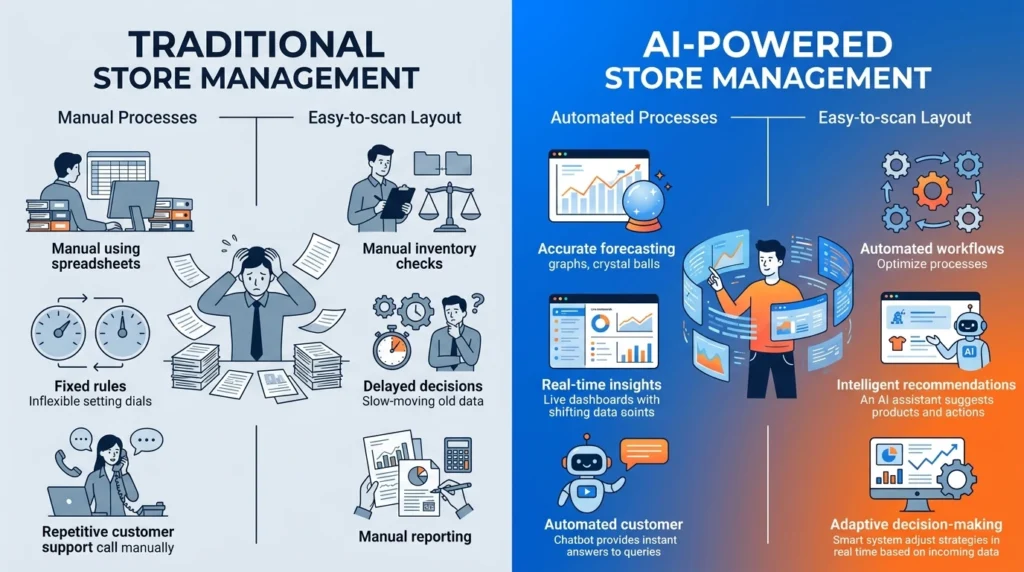
Instead of relying entirely on spreadsheets, fixed rules, and manual monitoring, these systems analyze store data and help merchants make faster operational decisions.
At its simplest, think of AI store management software as a decision-making layer that sits alongside your existing ecommerce platform. Your store might run on Shopify, WooCommerce, BigCommerce, or a custom platform, while AI tools analyze the information generated by that store.
For example, a traditional inventory system might tell you that a product has sold 80 units this month. An AI-powered system may go a step further and estimate how many units you’re likely to sell next month based on previous sales, seasonality, promotions, and other available signals.
That difference is important.
Traditional store management is often reactive: a merchant notices a problem and then responds. AI-assisted management can monitor patterns continuously and recommend or execute actions before a problem becomes serious.
The category includes several different types of software:
- Inventory and demand forecasting
- Automated purchasing and reordering
- Dynamic pricing
- AI customer support
- Product recommendations and personalization
- Fraud and risk detection
- Returns automation
- Analytics and business intelligence
Not every business needs all of these capabilities. In many cases, combining two or three specialized tools is more practical than purchasing one large platform with dozens of features.
If you’re new to AI-powered ecommerce, start with our AI Ecommerce Tool 2026: Complete Guide. It provides a broader overview of AI tools, strategies, and workflows that can help online stores choose the right technology for their business.
Why the Category Has Grown
AI-powered store management has become more accessible because advanced machine-learning capabilities that were once mainly available to large retailers are now offered through cloud-based software.
At the same time, ecommerce businesses have become more complex. A single merchant may sell through a website, marketplace, social commerce channel, and physical location while managing hundreds or thousands of products.
That creates a management problem.
The more channels, products, orders, and customer interactions a business has, the harder it becomes to monitor everything manually.
AI doesn’t eliminate that complexity, but it can reduce the amount of repetitive work required to manage it.
Why Store Owners Are Switching to AI in 2026
Quick Answer: Store owners are increasingly using AI because manual processes become difficult to maintain as product catalogs, sales channels, customer expectations, and operational data grow.
Several factors are driving this change.
Multichannel Selling
Many ecommerce businesses now sell through multiple channels rather than relying on one website.
Inventory has to remain synchronized across those channels. A delay or manual mistake can result in overselling, inaccurate availability, or unnecessary customer service issues.
Leaner Teams
Small and mid-sized ecommerce businesses often operate with very small teams.
One person may handle:
- Inventory
- Customer support
- Marketing
- Product updates
- Orders
- Supplier communication
- Reporting
Automating repetitive work can give a small team more time for decisions that actually require human judgment.
Higher Customer Expectations
Customers expect quick answers, accurate product information, reliable delivery updates, and relevant recommendations.
An AI support system can handle common questions at any hour while forwarding complicated cases to a human.
Pressure on Margins
When advertising, shipping, storage, and operational costs increase, reducing waste becomes increasingly important.
Better inventory planning can reduce money tied up in slow-moving products, while pricing automation can help merchants respond to changing market conditions.
More Data Than Humans Can Review
A growing store can generate thousands of data points from orders, products, customers, traffic, campaigns, and inventory movements.
AI systems can continuously analyze these signals instead of relying on a merchant to manually review spreadsheets every week.
Practical tip: Before buying an AI platform, identify the task that consumes the most repetitive time in your business. If inventory management takes five hours a week but customer support takes only one, inventory automation may be the better starting point.
Core Features to Look For
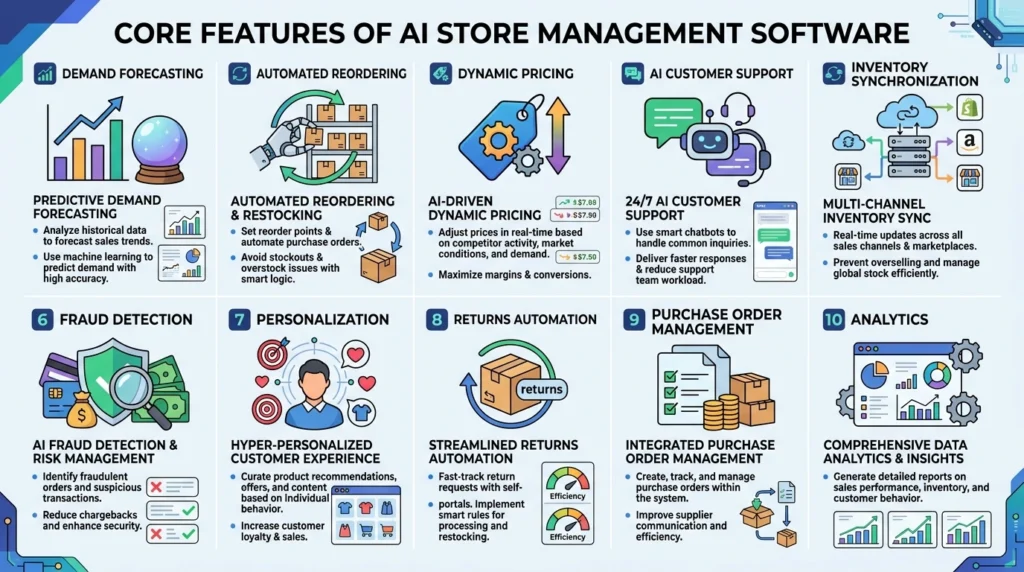
Quick Answer: The most useful AI store management features include demand forecasting, inventory automation, pricing intelligence, customer support, multichannel synchronization, analytics, personalization, and fraud detection.
| Feature | What It Does | Potential Business Impact |
|---|---|---|
| Demand Forecasting | Estimates future product demand | Helps reduce stockouts and excess inventory |
| Automated Reordering | Recommends or triggers replenishment | Reduces manual inventory monitoring |
| Dynamic Pricing | Adjusts prices based on configured signals | Helps respond to demand and competition |
| AI Customer Support | Handles common customer questions | Reduces repetitive support workload |
| Inventory Sync | Keeps stock information aligned across channels | Helps prevent overselling |
| Fraud Detection | Identifies suspicious transaction patterns | Can reduce fraudulent orders and chargebacks |
| Personalization | Recommends products to individual shoppers | Can improve discovery and conversion |
| Returns Automation | Categorizes and manages routine returns | Reduces manual processing |
| Purchase Order Management | Helps manage supplier purchasing | Improves replenishment workflows |
| Analytics | Identifies patterns across store data | Supports faster decision-making |
You don’t need every feature immediately.
A small store with one sales channel may get more value from basic forecasting and customer support automation. A multichannel retailer may benefit more from inventory synchronization and automated purchasing.
Demand Forecasting: One of the Most Valuable Features
Demand forecasting attempts to estimate future sales using historical and current data.
A useful forecasting system may consider:
- Previous sales
- Seasonal patterns
- Promotions
- Product lifecycle
- Inventory levels
- Supplier lead times
- Available traffic or conversion data
For example, a swimwear business shouldn’t treat strong summer sales as a permanent baseline for every month of the year.
The practical result might be a recommendation such as ordering approximately X units of a given SKU before the expected demand period.
The exact recommendation depends on the software and the quality of the available data.
Some platforms can also model different scenarios, helping merchants understand what might happen if a promotion performs above or below expectations.
Dynamic Pricing
Dynamic pricing software monitors selected market and business signals and can recommend or automate price changes according to predefined rules.
This can be useful for categories where demand and competition change frequently.
However, automation needs guardrails.
A pricing system should not be allowed to reduce a product’s price below a level that makes the sale commercially unacceptable.
Useful controls can include:
- Minimum price
- Minimum margin
- Maximum discount
- Maximum daily price change
- Manual approval
- Product exclusions
The goal isn’t simply to change prices faster. It’s to make better pricing decisions without sacrificing profitability.
How AI Store Management Software Works
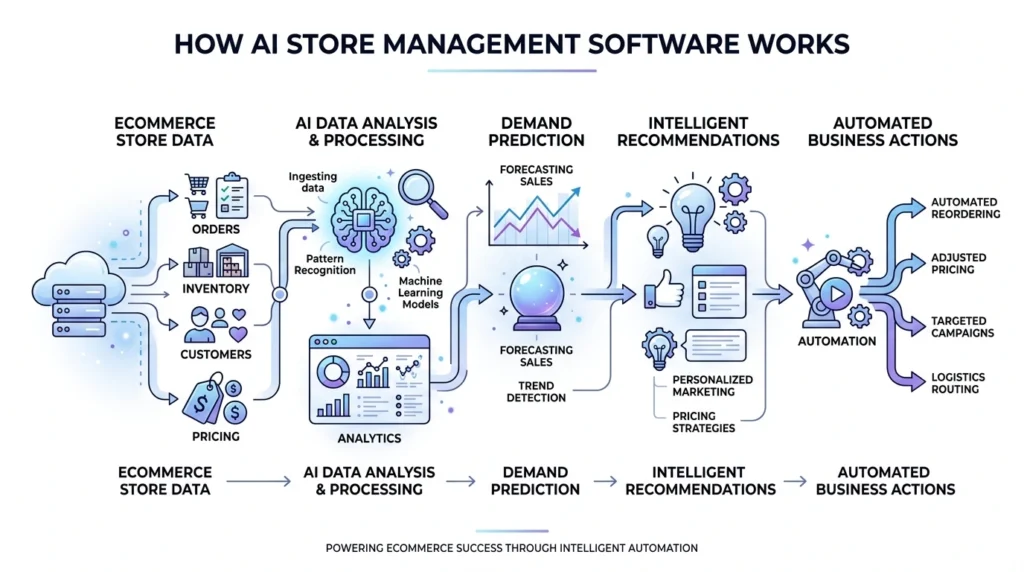
Quick Answer: Most AI store management platforms connect to ecommerce, inventory, sales, marketing, or supplier data through integrations or APIs. They analyze that information, generate predictions or recommendations, and may automate selected actions based on merchant-defined settings.
A typical workflow looks like this:
1. Data Ingestion
The system receives relevant information from your store and connected services, which may include:
- Orders
- Products
- Inventory
- Customer behavior
- Traffic
- Pricing
- Supplier information
2. Pattern Analysis
Machine-learning models look for relationships and recurring patterns within the available data.
3. Prediction
The system may predict demand, identify unusual orders, recommend products, or estimate other business outcomes.
4. Recommendation or Action
Depending on the platform, the software may either recommend an action for approval or execute an action automatically. For example, an inventory system might recommend purchasing additional units instead of automatically placing the order.
5. Continuous Improvement
As more relevant data becomes available, the system can evaluate outcomes and refine future recommendations.
This is different from simple rule-based automation. A basic rule might say: “If inventory falls below 10 units, send an alert.” An AI-assisted system may instead consider sales velocity, seasonality, supplier lead time, and other signals before recommending when and how much to reorder.
What Data Do These Tools Need?
Data requirements vary between platforms, but useful inputs can include:
- Historical sales
- SKU-level product information
- Inventory records
- Supplier lead times
- Order history
- Traffic data
- Conversion data
- Promotional history
A store with several years of clean historical data generally gives forecasting software more information to work with than a brand-new store.
That doesn’t mean new stores cannot use AI. However, businesses with limited historical data should be more cautious about treating automated forecasts as highly precise.
Types of AI Store Management Tools
Quick Answer: AI store management tools generally fall into five major groups: inventory and forecasting, pricing intelligence, customer support, personalization, and fraud/risk management.
1. Inventory & Forecasting Platforms
These focus on:
- Demand forecasting
- Stock planning
- Reorder recommendations
- Inventory monitoring
- Multichannel synchronization
Best suited to stores struggling with stockouts, overstock, or complex inventory.
2. Pricing Intelligence Tools
These help merchants monitor pricing signals and make pricing decisions. They can be particularly useful for competitive or fast-changing product categories.
3. AI Customer Support Platforms
These systems answer common questions about orders, shipping, returns, product information, and store policies. More complex conversations can be transferred to human agents.
4. Personalization Engines
These tools use customer behavior and purchase information to recommend relevant products or tailor parts of the shopping experience.
5. Fraud & Risk Detection
These systems analyze transaction and behavioral patterns to identify potentially suspicious orders. This can be especially valuable for stores selling expensive or frequently targeted products.
Should You Buy One Platform or Several?
There isn’t one correct answer.
An all-in-one platform can simplify management, but specialized tools may perform better for specific jobs.
Before choosing a suite, compare the actual capabilities you need rather than the number of features listed on the sales page.
Best AI Store Management Software by Use Case
Quick Answer: The best AI store management software depends on the specific problem you want to solve. Some platforms focus on inventory forecasting and replenishment, while others specialize in customer support, personalization, pricing, or broader ecommerce operations. Instead of choosing a tool simply because it uses AI, match the platform to your store’s biggest operational bottleneck.
There is no single AI platform that is best for every ecommerce business. A small Shopify store may need simple inventory forecasting and customer support automation, while a larger retailer may need advanced inventory planning, personalization, and multichannel operations.
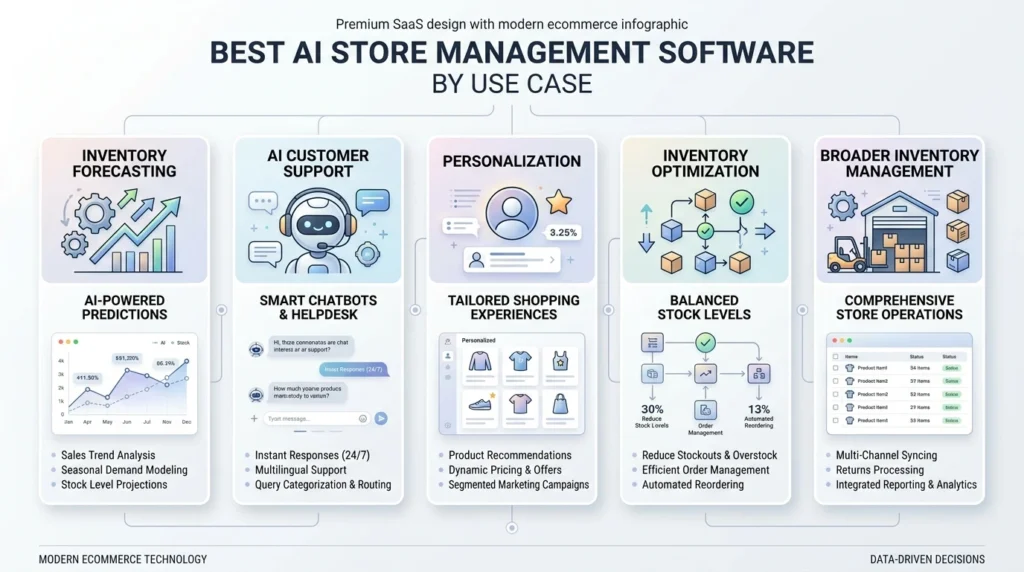
Here are some established options to consider by use case.
1. Best for AI Inventory Forecasting: Prediko
Best for: Shopify stores that need demand forecasting and inventory planning.
Prediko is an inventory planning platform designed for ecommerce businesses. It can help merchants forecast demand, plan inventory, and make purchasing decisions based on store data.
This type of tool can be useful when manually calculating reorder quantities becomes difficult as the product catalog grows.
Consider it if: Your main problems are stockouts, excess inventory, or deciding when and how much stock to purchase.
Shopify’s 2026 inventory-management guide includes Prediko among its recommended inventory apps, alongside other options such as Katana, Stock Sync, and Veeqo.
2. Best for Integrated Inventory Management: Shopify
Best for: Shopify merchants who want inventory management built directly into their ecommerce platform.
Shopify provides inventory management within Shopify Admin and supports inventory visibility across online, POS, and multiple locations. Its ecosystem also includes automation features and AI-enabled assistance through Shopify Sidekick.
For merchants already using Shopify, starting with the platform’s built-in inventory capabilities can make more sense than immediately adding another inventory system.
Consider it if: You want centralized inventory management without introducing another major platform.
3. Best for AI Customer Support: Gorgias
Best for: Ecommerce brands that receive a high volume of repetitive customer questions.
Gorgias offers an AI Agent designed for ecommerce customer interactions. It can help shoppers discover products and handle support conversations involving topics such as returns, order changes, and shipping updates. It can also work across channels such as email, chat, and SMS for connected Shopify stores.
This makes it particularly useful for stores where customer service consumes a significant amount of staff time.
Consider it if: Your team spends too much time answering repetitive questions about orders, products, shipping, returns, or availability.
4. Best for Ecommerce Personalization: Nosto
Best for: Growing and enterprise ecommerce brands focused on personalized shopping experiences.
Nosto provides AI-powered ecommerce personalization, product recommendations, search personalization, category merchandising, and other commerce-experience capabilities. Its platform uses customer and product data to personalize different parts of the shopping journey.
For example, instead of showing exactly the same product discovery experience to every visitor, personalization software can use behavioral signals to surface products that are more relevant to individual shoppers.
Consider it if: Your priority is improving product discovery, personalization, conversion, average order value, or customer retention.
5. Best for AI Inventory Optimization: Fabrikatör Inventory Planner
Best for: Shopify merchants looking for forecasting and purchase-order automation.
Fabrikatör Inventory Planner is listed in the Shopify App Store’s inventory forecasting category and is positioned around AI forecasting, inventory planning, and purchase-order automation.
This can be particularly useful for merchants who have moved beyond basic low-stock alerts and need more structured purchasing decisions.
Consider it if: You want forecasting and replenishment workflows rather than simply monitoring current inventory levels.
6. Best for Larger Inventory Operations: Cin7 Core
Best for: Growing retailers that need broader inventory and order-management capabilities.
Cin7 Core is listed in Shopify’s inventory ecosystem with capabilities including real-time inventory management, order automation, and AI forecasting.
It can make more sense for businesses with more complicated inventory workflows than a small store with only a handful of SKUs.
Consider it if: your business has multiple products, locations, or more complex inventory and order-management requirements.
Quick Comparison
| Software | Best For | Main Strength |
|---|---|---|
| Prediko | Inventory forecasting | Demand planning and inventory decisions |
| Shopify | Shopify merchants | Built-in inventory management and automation |
| Gorgias | Customer support | AI-powered ecommerce support and shopping assistance |
| Nosto | Personalization | AI recommendations, search, and merchandising |
| Fabrikatör Inventory Planner | Inventory planning | Forecasting and purchase-order automation |
| Cin7 Core | Growing inventory operations | Inventory, orders, and forecasting |
How to Choose Between Them
The right choice depends on your store’s biggest operational problem.
- If stockouts and purchasing decisions are your main concern, start by evaluating inventory forecasting platforms such as Prediko or Fabrikatör.
- If you’re already using Shopify and want to keep your technology stack simple, first evaluate Shopify’s native inventory capabilities before adding another platform.
- If customer support volume is the main bottleneck, an ecommerce-focused AI support platform such as Gorgias may be more relevant.
- If your priority is personalization and product discovery, Nosto is worth evaluating because its platform focuses specifically on AI-powered search, recommendations, merchandising, and personalized commerce experiences.
For more complex inventory operations, platforms such as Cin7 Core may be worth considering.
The important point is that these tools are not direct substitutes for one another. A store could reasonably use an inventory platform for forecasting, an AI customer-support platform for service, and a personalization platform for product discovery.
What to Check Before Buying
Software features, integrations, pricing, and AI capabilities can change frequently. Before choosing a platform, verify:
- Current ecommerce integrations
- AI and automation features included in your plan
- Inventory and order synchronization
- Data export options
- Human approval and override controls
- Pricing and usage limits
- Customer support
- Security and privacy policies
- Trial or demo availability
- Scalability as your order volume grows
Don’t choose a platform simply because it has the most AI features. Choose the one that solves your most expensive or time-consuming operational problem.
Top Use Cases by Business Size
Quick Answer: Small stores usually benefit from task automation, mid-sized stores gain more from multichannel coordination, and larger operations can use AI for forecasting, supply-chain optimization, personalization, and risk management at scale.
Small Stores: 1–2 Team Members
Priorities often include:
- Low-stock monitoring
- Reorder recommendations
- AI customer support
- Basic forecasting
- Automated order updates
For a small store, the main goal is usually saving time, not building an extremely sophisticated AI operation.
If you’re running a 20-SKU store from your phone, you probably don’t need an enterprise forecasting platform. The better investment may be a simple automation that removes one repetitive task from your daily workload.
Mid-Sized Stores
As a store grows, complexity increases.
Useful capabilities include:
- Cross-channel inventory synchronization
- Customer segmentation
- Pricing automation
- Returns automation
- Demand forecasting
- Advanced reporting
This is often the stage where automation starts delivering significant operational value because manual processes become difficult to maintain.
Enterprise & High-SKU Operations
Large retailers may need:
- Multi-warehouse forecasting
- Supply-chain risk analysis
- Fraud prevention
- Advanced personalization
- CRM integration
- Large-scale inventory optimization
At this level, software selection becomes more technical. Integration with existing enterprise systems, data governance, security, scalability, and model performance may matter as much as the visible AI features.
AI vs. Traditional Store Management Tools
Quick Answer: Traditional tools generally depend more on manual monitoring and predefined rules, while AI-powered systems can analyze changing data patterns and make adaptive recommendations. The better choice depends on store complexity and operational needs.
| Factor | Traditional Tools | AI-Powered Tools |
|---|---|---|
| Setup | Usually simpler | Often requires more configuration |
| Ongoing effort | More manual | More automated |
| Adaptability | Rule-based | Can adapt to changing patterns |
| Cost | Often lower | Can be higher |
| Data requirements | Usually lower | Often higher |
| Transparency | Rules are easy to understand | Some models are harder to explain |
| Best for | Small/simple operations | Growing/complex operations |
Neither approach is automatically better.
A store selling a few dozen products through one channel may be perfectly well served by a traditional inventory system. A retailer managing hundreds of SKUs across several channels may benefit much more from intelligent automation.
When Traditional Tools Still Make Sense
AI isn’t automatically the right answer.
Traditional software may be sufficient when:
- Your catalog is small
- Demand is predictable
- You have one sales channel
- Inventory changes infrequently
- Manual management takes very little time
The decision should be based on operational problems—not simply on the popularity of AI.
How to Measure the ROI of AI Store Management Software
Quick Answer: The strongest ROI opportunities usually come from reducing lost sales, excess inventory, repetitive labor, support workload, and operational errors. Actual results vary significantly between businesses.
Instead of relying on generic vendor percentages, calculate the areas that matter to your own store.
Lost Sales From Stockouts
If a popular product frequently goes out of stock, better forecasting may help protect sales that would otherwise be lost.
Excess Inventory
Slow-moving inventory ties up capital and may create storage or discounting costs. Reducing unnecessary stock can improve cash flow.
Labor Savings
Calculate how many hours your team spends each week on inventory checks, reorder calculations, customer questions, pricing updates, and manual reporting. Then estimate the value of those hours.
Support Efficiency
If an AI support system resolves routine questions without human intervention, your team can spend more time handling complicated cases.
How to Evaluate Vendor ROI Claims
Don’t accept a vague statement such as “our software reduces stockouts by 30%” at face value. Ask:
- Compared with what baseline?
- Over what period?
- How many stores were included?
- What type of stores?
- How was the improvement measured?
- Was the result independently verified?
A percentage without context is a marketing claim, not necessarily evidence that the same result will happen in your store.
How to Choose the Right Platform
Quick Answer: Choose software based on your ecommerce platform, biggest operational bottleneck, integration quality, automation controls, pricing, data policies, and scalability.
Before purchasing, check the following:
- Compatibility with your ecommerce platform
- Required integrations
- Two-way or one-way data synchronization
- Transparent pricing
- Data export options
- Human override controls
- Automation settings
- Customer support
- Onboarding process
- Scalability
- Trial or testing options
- Security and data retention policies
Questions to Ask Vendors
Before signing a contract, ask:
- What happens to our data if we cancel?
- Can we export our historical data?
- How often are models updated or retrained?
- Can we test recommendations before enabling automation?
- Can users manually override automated decisions?
- Are there usage-based fees?
- What happens if our order volume doubles?
- What does onboarding actually involve?
- Which integrations support full automation?
- How is performance measured?
These questions often reveal more than a product’s feature page.
Common Mistakes to Avoid
Quick Answer: The biggest mistakes are automating too quickly, trusting marketing claims without testing, ignoring data quality, and failing to establish safety controls.
Turning On Full Automation Immediately
Start with recommendation-only mode when possible. Review the system’s decisions before allowing it to automatically reorder products or change prices.
Ignoring Edge Cases
Seasonal products, discontinued items, bulk orders, and unusual promotions can distort predictions. Make sure the platform provides ways to exclude or flag unusual situations.
Choosing Based on the Word “AI”
“AI-powered” is now a broad marketing term. Ask what the system actually does and what data it uses.
Ignoring Data Quality
Duplicate SKUs, incorrect product categories, missing sales history, and inconsistent inventory data can reduce the quality of automated recommendations. Clean your data before expecting sophisticated results.
Failing to Set Price Floors
If you’re using dynamic pricing, define minimum acceptable prices and margins. Never assume the system understands your profitability requirements automatically.
Judging the Software Too Quickly
Forecasting and personalization systems may require time to learn from your store’s data. Evaluate performance against predefined metrics rather than making a decision after only a few days.
Ignoring the People Using the System
A technically powerful tool can still fail if the team doesn’t understand how it works. Train the people responsible for daily operations and explain when they should trust, review, or override recommendations.
Implementation Roadmap: Getting Started
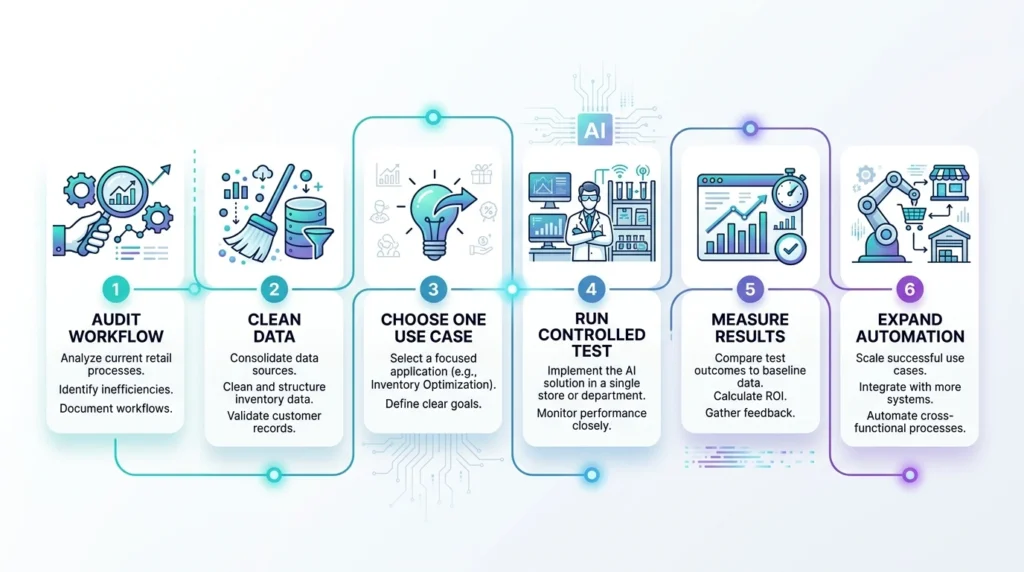
Quick Answer: A practical implementation should begin with a process audit and controlled testing. Start with one high-impact use case, compare recommendations against real outcomes, and expand automation gradually.
| Period | Recommended Action |
|---|---|
| Week 1–2 | Audit bottlenecks and clean store data |
| Week 3–4 | Connect the platform and test recommendations |
| Week 5–6 | Compare predictions with actual results |
| Week 7–8 | Automate the highest-confidence workflow |
| Ongoing | Review results and expand automation carefully |
- Step 1: Audit Your Current Workflow — Identify where your team spends the most time.
- Step 2: Clean Your Data — Check SKU names, product categories, inventory counts, historical orders, and supplier information.
- Step 3: Choose One Use Case — Don’t automate everything simultaneously. Start with one measurable problem.
- Step 4: Run a Controlled Test — Use recommendation-only mode when available.
- Step 5: Measure Results — Track performance against your pre-AI baseline.
- Step 6: Expand Carefully — Once the first workflow performs reliably, consider automating another area.
Metrics to Track
Before implementation, establish measurable targets. Useful metrics include:
- Stockout frequency
- Excess inventory value
- Support resolution time
- Manual hours per week
- Gross margin
- Return-processing time
- Average order value
- Forecast accuracy
Without a baseline, it’s difficult to determine whether the software is actually generating a positive return.
The Future of AI in Store Management
Quick Answer: AI store management is moving toward more connected systems that can coordinate inventory, pricing, marketing, customer service, and analytics rather than treating each function separately.
Cross-Functional Automation
The next generation of tools will increasingly connect different operational decisions. For example, a system could recognize that a product is likely to sell out soon and recommend reducing advertising exposure instead of increasing demand further.
Natural-Language Store Management
Store owners are increasingly able to interact with business data through conversational interfaces. Instead of opening several reports, a merchant may eventually be able to ask something like “which products are most likely to stock out this month?” and receive a prioritized answer based on available data.
Inventory-Aware Marketing
Closer connections between inventory and advertising systems could help merchants avoid spending heavily on products that are almost out of stock.
More Human Oversight, Not Less
Greater automation doesn’t necessarily mean humans become irrelevant. For important decisions, businesses will still need people to establish rules, review unusual situations, and decide how much risk the company is willing to accept.
The future is likely to be less about replacing store operators and more about giving them better decision-making tools.
Frequently Asked Questions
Is AI store management software worth it for a small store?
It can be, especially when repetitive tasks consume several hours each week. A small store doesn’t necessarily need a complete AI management suite, though. Starting with one specific problem — such as customer support or inventory monitoring — is often more practical.
Does AI store management software replace human employees?
No. These tools are primarily useful for repetitive, data-heavy tasks. Human judgment remains important for strategy, supplier relationships, unusual customer situations, product decisions, and business planning.
How much does AI store management software cost?
Pricing varies widely depending on the platform, features, store size, order volume, and usage. Small-business tools may use monthly subscriptions, while larger platforms may use customized or usage-based pricing. Always check what is included before comparing prices.
Can AI store management tools integrate with Shopify or WooCommerce?
Many established tools support major ecommerce platforms, but integration depth varies. Some may only read store data, while others can perform two-way synchronization and automated actions. Check the exact integration capabilities before purchasing.
How long does it take to see results?
The timeline depends on the use case, data quality, store size, and software. Simple workflow automation may provide benefits quickly, while forecasting and personalization systems may require more historical data and testing before their performance can be evaluated properly.
Is sales data secure with AI store management platforms?
Security practices vary between vendors. Before connecting your store, review the provider’s security documentation, privacy policy, data retention practices, access controls, and relevant compliance information.
Can I use multiple AI store management tools together?
Yes. For example, a merchant might use one platform for inventory forecasting and another for customer support. The important thing is to make sure the systems don’t create conflicting automated actions.
What happens if the AI makes a pricing or inventory mistake?
Good platforms should provide controls for reviewing, pausing, or overriding automated actions. Before purchasing, confirm exactly what happens when an automated recommendation is wrong and whether you can reverse or approve decisions manually.
Do I need coding skills?
Usually not for mainstream ecommerce platforms. Many tools use apps, integrations, and visual dashboards. More advanced implementations involving custom stores or complex workflows may require developer assistance.
Final Verdict: Is AI Store Management Software Right for You?
Quick Answer: AI store management software is worth considering when manual work is consuming significant time, operational errors are costing money, or growing complexity makes traditional processes difficult to maintain.
You don’t need to automate your entire store. Start with the problem that costs you the most.
- If customer support is overwhelming your team, begin there.
- If stockouts are hurting sales, start with forecasting and inventory management.
- If pricing changes constantly, investigate pricing intelligence.
The stores that get the most value from AI usually don’t automate blindly. They clean their data, test recommendations, keep human override controls, and measure results against their own baseline.
That’s the important distinction. AI store management software isn’t a replacement for good ecommerce operations. It’s a way to make those operations more efficient, responsive, and scalable.
Editorial note: Product features, pricing, integrations, and availability can change over time. Always verify current information directly with the software provider before making a purchasing decision.
For related reading, see our guides on AI tools for Ecommerce: Complete Guide pillar page, AI tools for small ecommerce businesses,& best AI apps for Ecommerce in 2026: 25+ tools to automate